
Vector vs Raster for Logos: The 2026 Guide to Production-Ready Branding
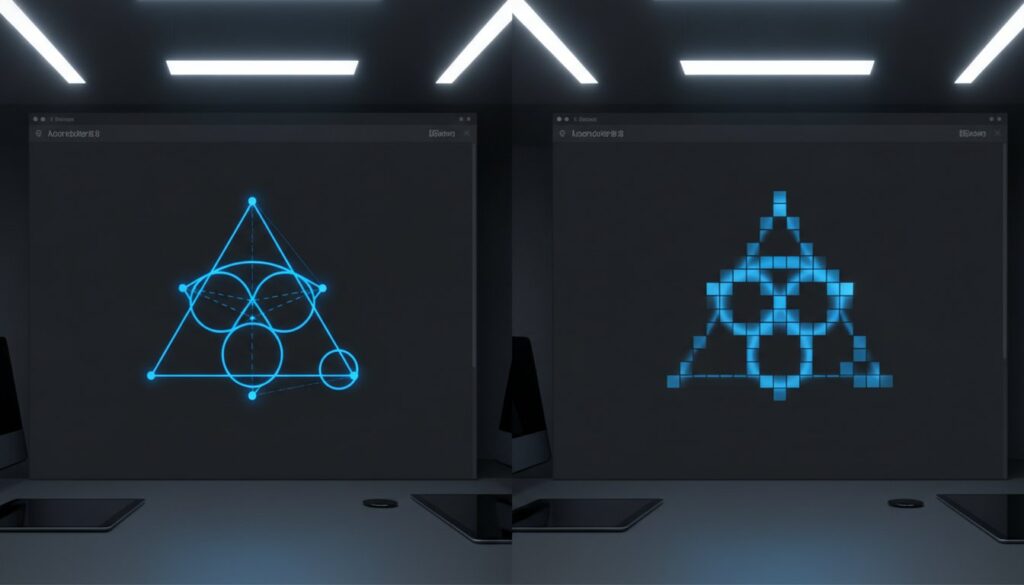
Your brand’s survival on a physical storefront or an embroidered polo depends entirely on a mathematical equation you might never see. If you’re sending a standard .jpg to a professional vendor in 2026, you’re likely setting yourself up for a pixelated disaster and a rejected production order. It’s frustrating when your visual identity looks sharp on a laptop but falls apart the moment it’s scaled for a large banner. You’ve likely felt that confusion while staring at a folder of .ai, .eps, and .png files, unsure which one will work for your project. Understanding the fundamental debate of vector vs raster for logos is the only way to ensure your assets remain production-ready.
This guide helps you master the technical differences between these formats so your branding remains crisp and scalable for any manufacturing process. You’ll learn exactly what a professional logo kit requires to satisfy printers and embroidery shops alike. We’ll break down the specific file extensions you need to know, explain how modern AI tools have changed the conversion landscape, and provide a clear path to maintain brand consistency across all media. It’s time to move past blurry graphics and build a toolkit that performs under any pressure.
Key Takeaways
- Understand the fundamental difference between mathematical paths and pixel grids. Vectors provide infinite scalability that raster files simply cannot match.
- Navigate the vector vs raster for logos choice by focusing on manufacturing requirements. Vectors serve as the essential blueprint for processes like embroidery digitizing and laser engraving.
- Recognize the limitations of raster formats to avoid branding failures. High-resolution pixels still suffer from quality loss when scaled for large signage or banners.
- Learn why manual redrawing is the professional standard for converting artwork. This process ensures smoother curves and fewer nodes than automated tracing tools.
- Establish a master logo kit for your brand. Collect the specific file formats required for both modern web performance and physical production.
Defining the Core: Mathematical Paths vs. Pixel Grids
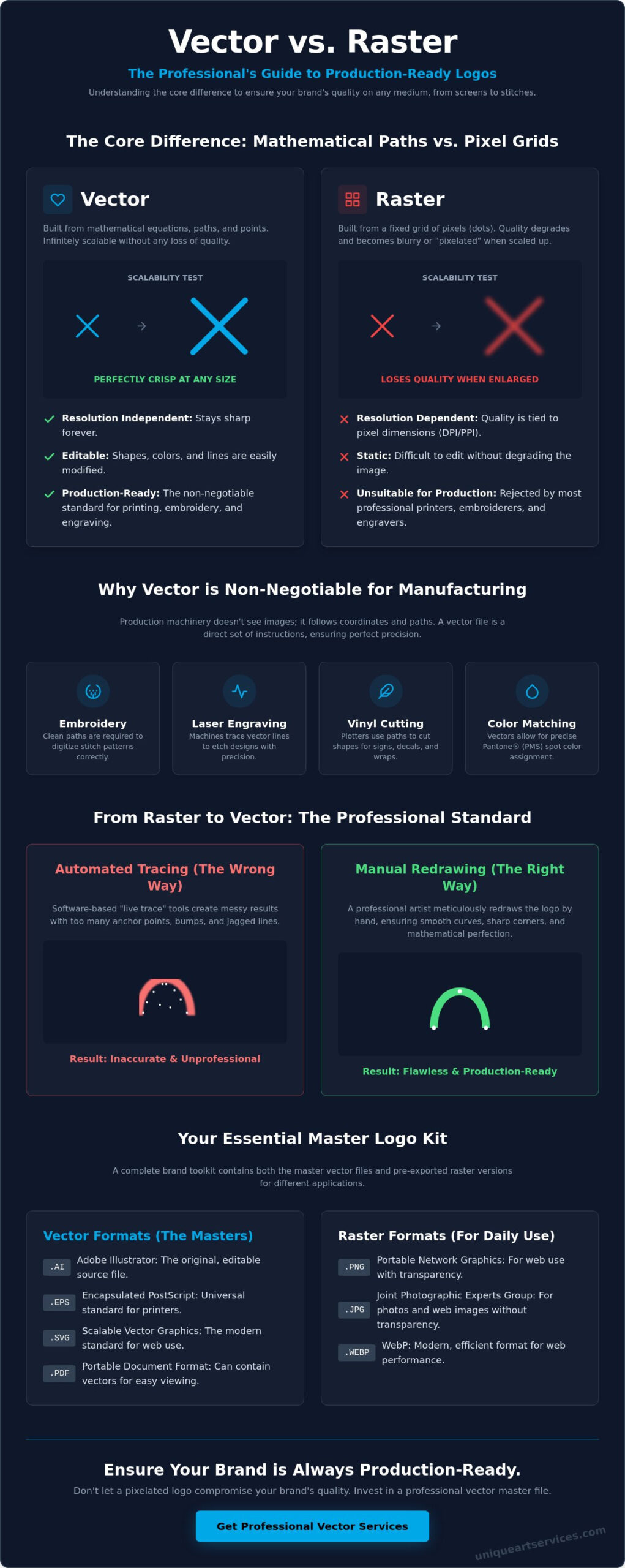
At its most basic level, the debate of vector vs raster for logos comes down to how a computer stores and interprets visual information. Raster images are built like a mosaic. They consist of a finite grid of colored pixels, often referred to as a bitmap. The quality of these images depends entirely on their resolution, which is measured in dots per inch (DPI) or pixels per inch (PPI). In contrast, Vector graphics utilize mathematical equations to identify points, lines, and curves. Instead of recording where every single “dot” is located, a vector file remembers the geometric relationship between shapes.
This fundamental difference dictates how each format handles empty space and transparency. In a vector file, “empty” areas are truly empty. The software defines the shape and leaves the surrounding area as a mathematical void, allowing for perfect transparency without any artifacts. Raster files often require a background layer. Even when saved with transparency, they can suffer from “fringing” or stray pixels along the edges if the resolution isn’t high enough. This makes vectors the superior choice for layering logos over complex backgrounds or varied textures.
Vector Graphics: The Power of Geometry
The primary advantage of vectorizing art is resolution independence. Because the image is based on math rather than a fixed grid, you can scale a logo from the size of a business card to the side of a stadium without losing a single ounce of detail. The software simply recalculates the equations every time you adjust the size. Vectors rely on anchor points and paths to define edges, ensuring every curve remains perfectly smooth and every corner stays sharp. Beyond scalability, these files are remarkably efficient. A complex vector logo usually has a smaller file size than a high-resolution raster equivalent because it only stores coordinates and color values rather than millions of individual pixels.
Raster Images: The Limitation of Fixed Pixels
Raster images are the standard for photography, but they’re a liability for branding. When you stretch a raster logo beyond its original dimensions, the software has to “guess” how to fill the newly created gaps between pixels. This results in the dreaded pixelation effect, where edges look blurry, blocky, or jagged. Even a high-resolution raster saved at 300 DPI has a physical breaking point. It’s a static snapshot of your brand. Common formats like JPEG, PNG, and WebP are excellent for digital displays and social media, but they aren’t production-ready blueprints. If your original file is too small, no amount of resolution boosting can restore the lost clarity.
Why Vector is the Non-Negotiable Standard for Logo Design
The transition from a digital screen to a physical object is where most branding fails. Plotter-based manufacturing, such as vinyl cutting for vehicle wraps or laser engraving for corporate awards, requires the absolute precision of a path. These machines don’t see colors or shading; they follow coordinates. When evaluating vector vs raster for logos, the decision usually ends at the production line. A raster file tells a machine to look at a grid of dots. A vector file provides a set of instructions for the machine to follow. This mathematical clarity is why vectors serve as the primary blueprint for embroidery digitizing. Without these paths, a digitizer must manually recreate the artwork before a single stitch can be placed.
Color management is another area where vectors outperform rasters. Vectors allow for precise Pantone (PMS) matching by assigning specific spot colors to geometric shapes. In a raster file, a “solid” blue logo actually consists of hundreds of slightly different blue pixels along the edges to create the illusion of smoothness. This makes it nearly impossible for a printer to guarantee color consistency across different materials. Using industry-leading graphic design tools, designers can easily swap colors, adjust stroke weights, or modify shapes without damaging the underlying file. This flexibility ensures your brand remains agile as your marketing needs evolve.
Infinite Scalability for Global Branding
A professional brand must survive a journey from a 16-pixel favicon to a 40-foot billboard. One high-quality vector file replaces a dozen different raster sizes, saving your team from managing a cluttered folder of “large,” “medium,” and “small” versions of the same logo. This “lossless” scaling is the only way to maintain professional standards. When you scale a vector, the software recalculates the geometry instantly. There is no blur, no distortion, and no loss of integrity. It’s the most efficient way to future-proof your visual identity against new display technologies and large-format printing requirements.
Production-Ready Files for Promotional Products
Vendors in the promotional space, from screen printers to merchandise manufacturers, almost always require vector art for promotional products. These files are essential because vector paths guide the physical movement of the needle or laser. If you provide a low-resolution raster, the vendor will likely charge an “art prep fee” to redraw the file themselves. These fees add up quickly and often result in a logo that doesn’t quite match your original vision. You can avoid these delays and extra costs by maintaining a clean vector version of your artwork. If your current files aren’t meeting these standards, a professional vector art service can transform your existing graphics into production-ready assets.
Recognizing the Limits of Raster Logos in 2026
While raster files like JPEGs or PNGs are suitable for a social media profile picture or a small website icon, they’re fundamentally incapable of serving as a brand’s master asset. The point of failure for a raster logo occurs the moment it’s scaled beyond its original pixel dimensions. Unlike the mathematical flexibility found in the vector vs raster for logos comparison, a raster file is a locked container. If you try to force a 300-pixel logo onto a 3-foot banner, the software has no choice but to enlarge the existing pixels. This creates a soft, muddy appearance that undermines your brand’s authority.
Background removal highlights another significant limitation. In a raster environment, the logo and its background are often baked together. Even with a transparent PNG, anti-aliasing creates a halo of semi-transparent pixels along the edges. These stray pixels look messy when the logo is placed over dark or patterned surfaces. Additionally, businesses often try to solve resolution issues by creating massive, high-resolution raster files. This leads to extreme file size bloat. A high-res TIFF might take up 50MB of storage, while a superior vector version of the same logo would likely remain under 1MB. Lightweight files are easier to share, store, and process.
A common misconception is that simply saving a PNG as an EPS magically creates a vector file. It doesn’t. This process merely wraps a raster image inside a vector container. It’s like putting a photograph inside a sturdy box. The box is professional, but the contents are still limited by their original pixel count. True vectorization requires a structural change to how the data is stored, moving from a grid of dots to a series of paths.
The Pixelation Trap in Large-Scale Printing
Visual artifacts like jagged edges or compression noise immediately signal a lack of professionalism. When these artifacts appear on a digital proof, printers will often reject the production order to avoid a poor final result. You can check your own logo with a simple zoom test. Open your file and zoom in to 600%. If the edges remain razor-sharp, it’s a vector. If you see blurry blocks or fuzzy lines, you’re looking at a raster that will fail in large-format applications.
Why Raster Files Fail in Embroidery and Apparel
In the world of apparel, there’s a massive technical gap between a pixel and a stitch. Embroidery machines require specific pathing data to know where the needle should move and how dense the thread should be. Raster files provide none of this coordinate data. This is why professional raster to vector conversion is a mandatory first step for quality apparel design. Without a clean vector path, a digitizer cannot accurately translate your logo into thread. This results in distorted shapes, poor durability, and a finished product that doesn’t reflect your brand’s quality. Understanding the principles of custom logo design for embroidery can help you engineer your artwork from the start to avoid these costly production failures.
Transforming Raster Logos into High-Precision Vectors
If you’ve identified that your current logo assets are stuck in a pixel-based format, the next step is a structural transformation. The goal is to move from a static grid of colors to a dynamic set of mathematical paths. While the market offers several “one-click” solutions, the choice in the vector vs raster for logos workflow often dictates the final quality of your physical branding. A high-precision vector isn’t just about scalability. It’s about the efficiency and cleanliness of the file’s construction.
A professional vector file must be lean. This means it contains the minimum number of anchor points necessary to define a shape. When a file is over-constructed with thousands of unnecessary nodes, it becomes difficult for manufacturing software to process. By focusing on precision during the conversion phase, you ensure that your logo remains easy to edit and compatible with every vendor’s equipment.
The Pitfalls of Automated Tracing Software
Automated tracing tools attempt to guess where lines should be based on color contrast. This often results in “blobby” edges and a chaotic number of anchor points. These excessive nodes are more than just a technical nuisance; they often cause embroidery machines to stutter or vinyl cutters to tear the material. Because an AI tracer doesn’t understand design intent, it can’t distinguish between a sharp corner and a slight curve. This lack of precision leads to a loss of brand integrity that becomes obvious the moment the logo is enlarged.
The Advantage of Professional Manual Redrawing
Professional manual redrawing is the gold standard for vector art conversion services. In this process, a seasoned designer uses the original raster as a template and manually places every anchor point. This human touch ensures 100% accuracy and allows for the correction of existing design flaws, such as asymmetrical shapes or slightly crooked lines that may have existed in the original low-res file.
Font reconstruction is a critical component of manual conversion. Automated tools often distort letterforms, turning clean typography into unrecognizable shapes. A professional service identifies the original font or redraws it letter-by-letter to maintain the exact weight and spacing of your brand’s identity. This methodical approach results in a “first-time-right” file that’s ready for any manufacturing process. When time is a factor, our team provides a 12-hour turnaround to keep your production schedule on track. You can get started with professional vector art conversion today to ensure your logo is truly production-ready.
Implementing a Vector-First Strategy for Your Brand
A professional brand is a prepared brand. Building a strategy around vector vs raster for logos is about more than just aesthetics; it’s about operational efficiency. To avoid production delays, every business must maintain a “Master Logo Kit.” This kit shouldn’t just live on a single designer’s hard drive. It needs to be organized in a centralized cloud location with clear naming conventions. When your team has immediate access to scalable assets, you remove the friction from the creative process and ensure that your visual identity remains consistent across every touchpoint.
Communication with external vendors is the final piece of the puzzle. When a printer or an embroidery shop asks for your logo, they’re looking for specific data, not just a picture. Providing a vector file from the start demonstrates professional competence and protects your bottom line. It prevents the “art prep fees” mentioned earlier and ensures that the person operating the machinery has the exact coordinates needed for a perfect result. In 2026, where high-resolution displays and responsive web design are the standard, your assets must be as agile as your business. Brands that invest in custom logo design for embroidery from the outset find that their artwork transitions seamlessly from screen to fabric without costly rework.
Essential Vector File Formats for 2026
Not all vector files serve the same purpose. Understanding the nuances of each extension is critical for proper asset distribution. You should consult a comprehensive vector file format guide to master the specifics, but the general rules are straightforward. Use .SVG for your website to ensure your logo stays sharp on 5K monitors and mobile devices. Use .EPS or .PDF for professional printing and large-format signage. Keep your .AI files as the internal “master” for future edits. For embroidery digitizing, providing an .AI or .EPS file gives the digitizer the cleanest possible paths to work with, resulting in superior stitch quality.
Establishing Your Brand’s Visual Backbone
A vector master file is the only future-proof asset for a brand because it remains compatible with any display technology or manufacturing method developed in the future. Investing in high-quality vector assets today creates long-term cost savings by eliminating the need for repeated redraws or emergency file fixes. You’ll never have to worry about a logo looking “dated” due to pixelation or blurriness. If your current toolkit is missing these essential formats, don’t let it stall your next marketing campaign. Ensure your logo is production-ready today; you can get a 4-hour rush vector conversion to secure your brand’s visual backbone immediately.
Future-Proof Your Brand Identity
The technical distinction of vector vs raster for logos determines whether your brand identity survives the transition from a digital screen to a physical product. While raster files are suitable for social media icons, only vector paths provide the mathematical precision required for professional embroidery, engraving, and large-format printing. By securing a master logo kit now, you eliminate production friction and protect your brand from the visual degradation caused by pixelation.
Building a stable visual backbone requires assets that perform under any manufacturing pressure. Our team leverages 15+ years of industry experience to deliver high-precision manual redrawing with a 99% first-time-right rate. Whether you need a standard turnaround or our 4-hour rush processing, we ensure your files meet the highest professional standards. We focus on the fine details so you can focus on growing your business.
Get Your Production-Ready Vector Conversion in 12 Hours and move forward with the confidence that your branding is ready for any challenge. Your brand deserves to be seen in its best light, and we’re ready to help you make it happen.
Frequently Asked Questions
Can I turn a JPEG into a vector by just changing the file extension?
No, simply renaming a file from logo.jpg to logo.eps does not change its internal structure. A JPEG is a collection of pixels, while a true vector consists of mathematical paths. To convert the file correctly, a designer must redraw the artwork using anchor points and lines. Changing the extension only creates a “wrapped” raster file that will still pixelate when enlarged.
Why does my printer keep asking for a “vector file” when my PDF looks fine?
A PDF is a versatile container that can hold both raster and vector data. Your PDF likely contains a low-resolution image that looks acceptable on a screen but lacks the mathematical paths required for production machinery. Printers need these coordinates to guide cutting blades, lasers, or printing heads. If the file doesn’t contain actual paths, the final product will appear blurry or jagged.
What is the best vector format for a logo in 2026?
The ideal format depends on your specific production needs. For modern web design and responsive interfaces, SVG is the industry standard due to its small file size and perfect clarity on high-resolution displays. For physical manufacturing, .AI and .EPS remain the preferred formats for printers and embroidery digitizers. A professional brand kit should include all three to ensure total compatibility across all media.
Is a high-resolution 300 DPI PNG considered a vector?
No, a PNG is always a raster file, regardless of its resolution or DPI setting. While a 300 DPI image contains more detail than a standard web file, it is still a fixed grid of pixels. In the technical comparison of vector vs raster for logos, the PNG will eventually fail when scaled for large signage. Only a true vector remains infinitely sharp at any size.
How much does it cost to convert a raster logo to a vector?
The cost of conversion depends on the complexity of your original artwork and your required turnaround time. A simple typographic logo requires less manual labor than a complex illustration with intricate details and multiple colors. Most professional services analyze the original file to provide a quote based on the expected design time. Investing in a high-quality redraw prevents expensive production errors later.
Can vector files be used on social media or websites?
Yes, but you must choose the appropriate format for the platform. SVG files are perfect for website logos because they stay crisp on all screen sizes and help improve page load speeds. Most social media platforms, however, require raster uploads like PNG or JPEG. You can easily export these specific sizes from your master vector file to maintain perfect brand consistency across all digital profiles.
What happens if I try to embroider a raster logo without converting it first?
The embroidery software will be unable to generate a clean stitch path from a pixel-based image. Embroidery requires a specialized digitizing process that relies on the clear geometric lines found in a vector. Attempting to use a raster file usually results in distorted shapes, uneven thread density, and a finished product that looks unprofessional. A clean vector is the essential starting point for quality apparel.
Why is manual redrawing better than using Adobe Illustrator’s Image Trace?
Manual redrawing offers a level of precision that automated tools cannot match. Software like Image Trace often creates “blobby” edges and an excessive number of anchor points, which can crash manufacturing equipment or cause jagged cuts. A professional designer manually places each point to ensure perfectly smooth curves and sharp corners. This methodical approach also allows for the correction of original design flaws during the conversion.