
Professional Vector Artwork: The 2026 Guide to Scalable Design and Conversion
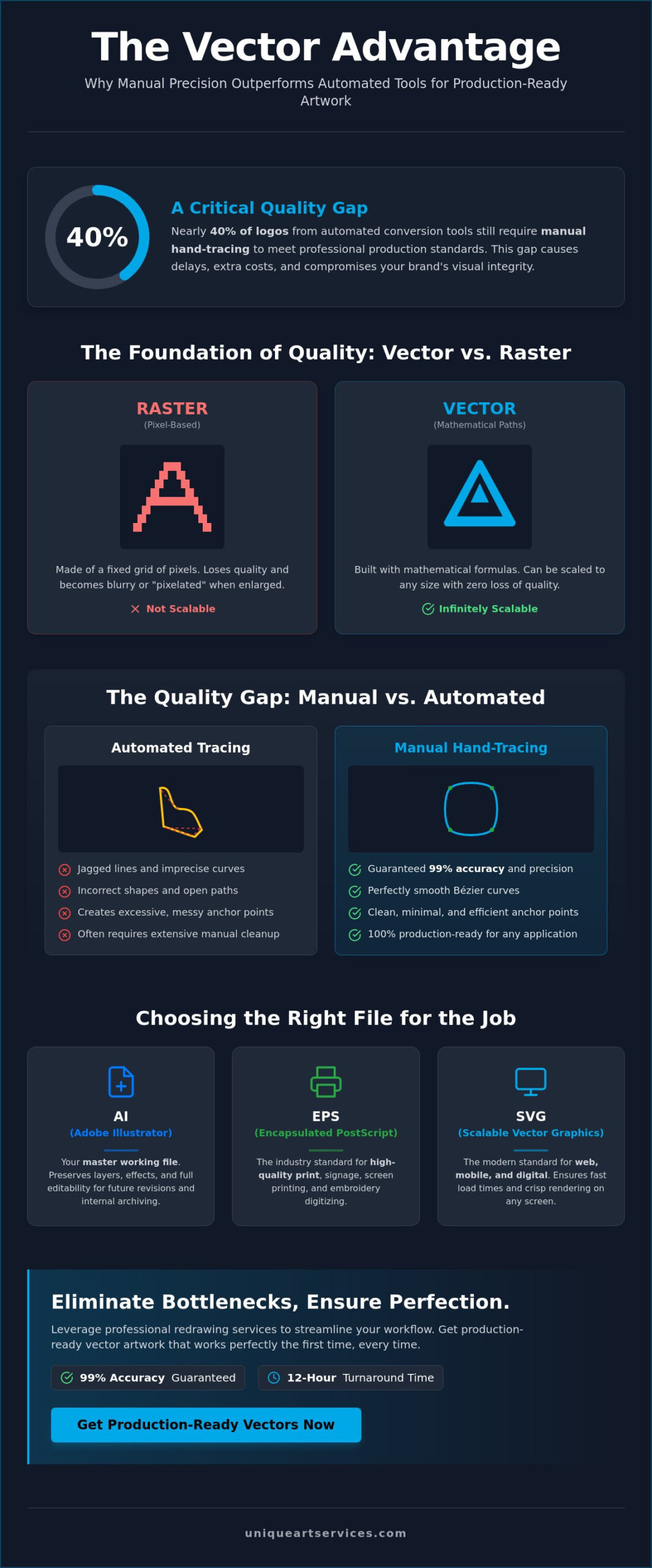
Did you know that nearly 40% of logos processed through automated conversion tools still require manual hand-tracing to meet professional production standards? While AI features in the 2026 release of Adobe Illustrator have accelerated many design workflows, they often fall short when technical precision is non-negotiable. You’ve likely experienced the frustration of a pixelated logo stalling a large-scale print or a “non-vector” file being rejected by your production team. These technical bottlenecks don’t just cause delays; they’re expensive hurdles that compromise your brand’s visual integrity.
We understand that you need files that work perfectly the first time, regardless of the application. This guide will help you master the technical and commercial advantages of high-quality vector artwork to ensure your designs remain scalable and production-ready across every medium. You’ll learn how to navigate the latest industry standards, choose the right file formats for web or embroidery, and implement a workflow that guarantees fast turnarounds. We will break down the essential differences between automated results and manual precision so you can keep your projects moving forward with total confidence.
Key Takeaways
- Learn why mathematical paths ensure your designs remain crisp at any scale, from small business cards to massive billboards.
- Identify the critical differences between AI, EPS, SVG, and PDF formats to choose the right file for every professional output.
- Avoid common production pitfalls by prioritizing manual precision over automated tools in your vector artwork conversion process.
- Streamline your manufacturing workflow by understanding the specific artwork requirements for screen printing and embroidery digitizing.
- Discover how to eliminate design bottlenecks by leveraging professional redrawing services that offer 99% accuracy and 12-hour turnarounds.
What is Vector Artwork and Why is it Essential for Your Brand?
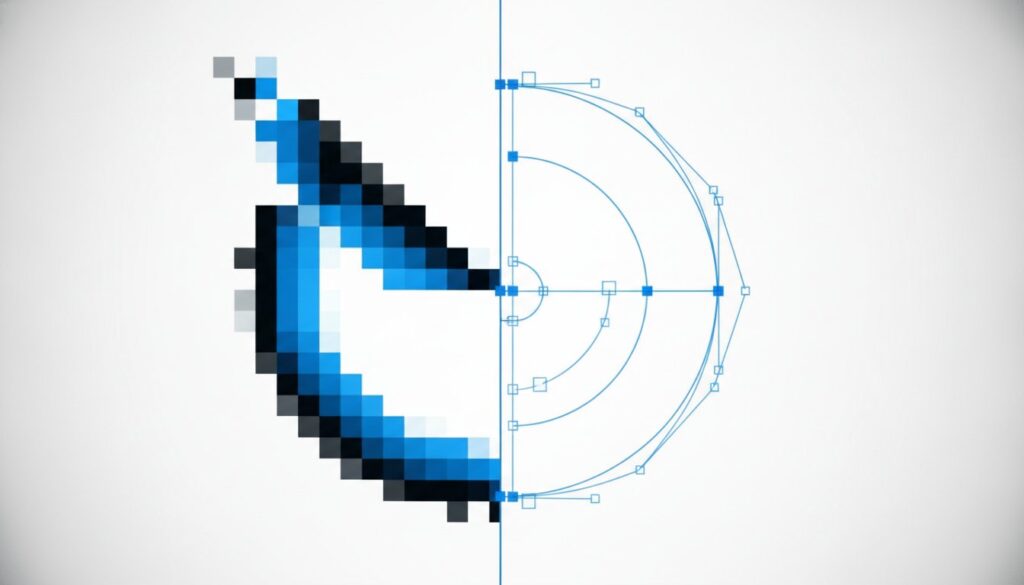
Your brand’s visual identity relies on clarity. When you look at a logo on a smartphone screen versus a massive storefront sign, you expect the same crisp edges and vibrant colors. This consistency is only possible through vector artwork. Unlike raster images, which are composed of a fixed grid of colored pixels, vectors are built using mathematical coordinates. When you enlarge a raster image, the pixels stretch, resulting in the “staircase” effect known as pixelation. Vectors avoid this entirely. They remain sharp because the computer recalculates the image every time you change its size.
The Mathematical Foundation of Professional Vectors
The precision of a vector file comes from Bézier curves. These are paths defined by start and end points, along with other points that control the shape’s curvature. Because these paths are based on geometry rather than a static grid, they possess resolution independence. You don’t have to worry about DPI (dots per inch) when creating the file. Vector artwork is a set of mathematical instructions for a computer to draw shapes. When exploring What is Vector Artwork, you’ll find that this data-driven approach allows for perfectly smooth lines that never degrade, no matter how much you zoom in.
Common Business Use Cases for Scalable Graphics
In a professional production environment, versatility is a requirement. A single master logo file must perform across a vast range of applications. This includes everything from the tiny favicon in a browser tab to 50-foot vinyl billboards. Modern typography is also built on these foundations; every font you use on your computer is essentially a collection of vector shapes. Beyond print, vectors are critical for the 2026 digital landscape. Responsive web design and mobile app icons rely on SVG (Scalable Vector Graphics) to ensure fast load times and perfect rendering on high-resolution Retina and OLED displays.
Maintaining brand consistency across multiple platforms requires a “vector-first” mindset. If your original assets are pixel-based, you’ll eventually hit a wall where the quality isn’t high enough for a specific project. This leads to production delays and expensive last-minute redesigns. By starting with professional vector artwork, you eliminate these technical bottlenecks. You ensure that your brand remains production-ready for screen printing, embroidery, or large-format digital printing without ever losing its professional edge.
The Technical Anatomy of a Production-Ready Vector File
A file that looks perfect on your monitor might still fail when it reaches the production floor. Achieving a truly production-ready status requires more than just saving a file in a specific format. It involves meticulous technical preparation to ensure that manufacturing hardware, such as vinyl cutters or screen printing presses, can interpret the data without errors. Understanding the practical applications of vector art helps you realize that the internal structure of the file is just as important as the visual design itself.
Color management is your first line of defense. You must design in CMYK for physical print to avoid unexpected color shifts. Digital-only assets should remain in RGB. Typography requires similar attention. Before sending vector artwork to a vendor, you should always “Create Outlines” for your fonts. This process converts editable text into static paths, preventing the production software from substituting your custom brand font with a generic alternative if the specific typeface isn’t installed on their system.
Which Vector Format Should You Use?
- EPS (Encapsulated PostScript): This remains a trusted industry standard for high-quality professional printing and signage. It’s highly compatible with legacy hardware and ensures that complex gradients and paths translate accurately.
- SVG (Scalable Vector Graphics): In 2026, SVG is non-negotiable for web performance. Its small file size and ability to scale without loss of quality make it the preferred choice for modern SEO and responsive interface design.
- AI (Adobe Illustrator): This is your master working file. It preserves layers, transparency settings, and editable effects, making it the ideal format for internal archiving and future revisions.
Nodes, Paths, and Anchor Points: A Quality Checklist
The efficiency of a production machine is directly tied to the complexity of your paths. Excessive anchor points create “noise” that can slow down laser cutters or cause embroidery needles to break. A professional vector file should have the minimum number of points required to define its shape. By simplifying your paths, you ensure a smoother finish and faster processing times.
You must also verify that all paths are “closed.” An open path might look like a solid shape on your screen, but it can prevent screen printing software from applying a color fill correctly. If you’re struggling with messy files or complex conversions, you can outsource your vector art redrawing to ensure every node is placed with mathematical precision. High-quality vector artwork eliminates overlapping nodes and redundant points, providing a clean blueprint for any manufacturing process.
Manual Redrawing vs. Automated Tracing: The Quality Gap
Speed often comes at the expense of precision. While AI-driven software in 2026 can generate a graphic in seconds, these tools frequently fall into the “Auto-Trace” trap. This results in “dirty” files filled with jagged edges, inaccurate color distributions, and “phantom” paths that are invisible on screen but catastrophic during manufacturing. For projects requiring low resolution image to vector conversion, relying on an algorithm usually produces vector artwork that no professional printer will accept. These tools lack the intelligence to distinguish between a stray pixel and a deliberate design element.
Manual redrawing is the only way to achieve true production-ready quality. This process involves a skilled designer hand-placing every anchor point with surgical precision. By tracing the original image manually, the designer can correct imperfections, sharpen soft corners, and ensure that every curve follows a logical mathematical path. This human touch transforms a low-quality raster into a high-performance asset that maintains its integrity at any scale.
The Hidden Cost of ‘Free’ Vector Converters
“Free” tools often carry a heavy price tag in wasted labor and materials. An automated trace might look passable at a glance, but the technical structure is usually a mess of overlapping nodes. If you send a poorly converted file to a vinyl cutter, the blade will follow every redundant point. This leads to shredded material, jagged cuts, and unnecessary machine downtime. A five-minute automated trace can easily require two hours of manual cleanup just to make the file functional. These hidden inefficiencies create bottlenecks that jeopardize tight deadlines and inflate project costs.
Why Human Designers Beat AI in Vector Conversion
A human designer understands the nuance of brand aesthetics. They know which curves should be perfectly smooth and which corners must remain sharp to preserve the logo’s original intent. AI often misinterprets fine details or complex gradients, turning them into a chaotic collection of thousands of tiny, uneditable shapes. Manual redrawing ensures your vector artwork remains clean, efficient, and easy to modify for future projects. To understand the specific technical failures of software, you can explore our detailed breakdown of common vector tracing errors. By choosing manual precision, you invest in a reliable foundation for your brand’s physical and digital presence.
Industry Applications: From Screen Printing to Embroidery
Precision in design translates directly to efficiency in manufacturing. While we previously discussed the technical anatomy of these files, their true value is realized on the production floor. Whether you’re branding a fleet of vehicles or personalizing corporate apparel, vector artwork provides the necessary instructions for specialized hardware to execute your design with total accuracy. Without these mathematical paths, manufacturing machines simply don’t have the data required to function.
Screen printing remains one of the most common applications for these files. This process requires distinct color separations to create the stencils for each ink layer. Because vectors are built from discrete objects, production teams can isolate colors instantly. This ensures that every layer aligns perfectly, preventing the muddy results often seen with raster-to-print attempts. Similarly, promotional products like engraved pens or branded USB drives require the clean, sharp lines of a vector to maintain legibility on a miniature scale.
Vectorizing Art for Apparel Manufacturing
Transitioning from a digital concept to a physical garment involves specific technical hurdles. One of the most critical is “trapping,” which is the process of slightly overlapping colors to ensure no fabric shows through if the press shifts slightly during the run. Professional vectorizing art simplifies this stage by allowing designers to manipulate individual paths without affecting the rest of the design. This clean foundation is also essential for embroidery. A digitizer uses these paths as a map to determine stitch directions, density, and underlay, ensuring the final embroidery is durable and high-quality.
Large-Format Signage and Vehicle Wraps
The scalability of vectors is most visible in large-format printing. A 200KB vector file will render a 50-foot billboard with perfect clarity, whereas a raster file would need to be a massive 2GB TIFF to achieve similar results. This efficiency makes vectors the only logical choice for vehicle wraps, where the design must stay sharp while conforming to curved surfaces. Modern vinyl plotters use these mathematical paths as a guide for a physical blade, cutting the material with a level of precision that pixels simply can’t provide. Even complex gradients can be handled effectively when the file is prepared with a production-first mindset.
Don’t let technical errors stall your manufacturing timeline. If you need clean, production-ready files for your next project, you can order professional vector art services from Unique Art Services LLP today. We specialize in transforming messy logos into high-performance vector artwork that works across every medium.
Scaling Your Production with Professional Vector Art Conversion
In a high-volume manufacturing environment, internal design teams often become the primary source of production delays. Managing a constant stream of low-quality files while trying to meet tight shipping windows is unsustainable. Outsourcing your vector artwork conversion to a dedicated specialist allows your team to focus on high-level creative work while ensuring that every file entering your production queue is technically flawless. This strategic shift eliminates bottlenecks and transforms your workflow into a high-speed operation.
At Unique Art Services LLP, we maintain a rigorous standard of 99% accuracy across all projects. Our global service hubs are staffed by expert designers who specialize in manual redrawing. This human-centric approach is the backbone of our reliability. We don’t rely on unpredictable automated tools; instead, we hand-trace every element to guarantee a clean, production-ready result. For those facing extreme deadlines, our rush order processing can deliver a finalized file in as little as 4 hours, keeping your machines running without interruption.
Efficiency Meets Precision: The 12-Hour Workflow
Our standard 12-hour turnaround is designed to provide maximum predictability for your business. The process begins with a thorough analysis of your raster source file. We identify potential issues, such as complex gradients or low-contrast edges, before the redrawing starts. Once the conversion is complete, every file undergoes a multi-stage quality check to verify path cleanliness, color accuracy, and node efficiency. Because Unique Art Services LLP operates global hubs, we provide around-the-clock support to clients in the UK, US, Canada, and Australia. Your project moves forward regardless of the time zone.
Getting Started with Unique Art Services LLP
We’ve simplified the onboarding process to ensure you can scale your operations immediately. Our platform accepts a wide variety of inputs, ranging from standard JPEGs and PNGs to hand-drawn sketches. This flexibility makes our services ideal for both high-volume print shops and individual freelance designers who need a dependable technical partner. We handle the technical complexities so you can focus on growing your brand. Ready to scale? Get your professional vector artwork conversion now.
Future-Proof Your Brand with Production-Ready Assets
Mastering the technical requirements of your design assets is the most effective way to eliminate manufacturing errors. By prioritizing manual redrawing over automated shortcuts, you ensure your vector artwork remains crisp on every medium, from tiny promotional items to massive billboards. Choosing the right file formats and maintaining clean paths will keep your production lines moving without the costly delays caused by pixelated or “dirty” files.
Unique Art Services LLP brings over 15 years of industry experience to every project. We maintain a 99%+ first-time-right accuracy rate and offer a standard 12-hour turnaround to support your business goals. Whether you’re managing a high-volume print shop or a single branding project, we provide the precision you need to stay competitive.
Ready to streamline your workflow? Order Professional Vector Art Conversion with 4-Hour Rush Delivery and get your files back today. Let’s get your brand ready for every application with absolute confidence.
Frequently Asked Questions
What is the difference between raster and vector artwork?
Raster images are composed of a fixed grid of pixels that lose clarity and become “blocky” when you enlarge them. In contrast, vector artwork uses mathematical formulas to define lines, points, and curves. This mathematical foundation provides infinite scalability, meaning your design remains perfectly crisp whether it’s printed on a small lapel pin or a massive stadium banner.
Can I convert a JPEG to a vector file myself?
You can use automated “auto-trace” tools, but these often produce “dirty” files with jagged edges and thousands of unnecessary anchor points. While software like Adobe Illustrator includes tracing features, they struggle with low-resolution sources or complex gradients. For professional manufacturing, manual redrawing by a specialist is the only way to ensure your file is clean and production-ready.
Why do print shops always ask for vector files (EPS or AI)?
Print shops require these formats because they contain the specific path data needed for scaling and color separations. Unlike a flat JPEG, an AI or EPS file allows the printer to isolate individual colors for screen printing or define precise cut lines for vinyl plotters. These files ensure the final physical product matches your digital design without any pixelation or distortion.
How long does it take to professionally redraw a logo into vector format?
A standard professional redrawing project typically follows a 12-hour turnaround window from the moment you submit your source file. If you’re working against a strict manufacturing deadline, rush order processing can deliver a finalized, high-accuracy file in as little as 4 hours. This speed allows you to resolve artwork issues without stalling your entire production schedule.
Will vectorizing my artwork change the way it looks?
A professional manual redraw preserves your design’s visual integrity while significantly improving its technical quality. Unlike automated software that might “round off” sharp corners or distort fine text, a human designer hand-traces every element to match your original intent. You’ll receive a version of your artwork that looks identical to the original but performs much better in print and embroidery applications.
Is an SVG file considered a vector format?
Yes, SVG (Scalable Vector Graphics) is a powerful vector format used primarily for web and digital displays. It uses XML-based code to define shapes, which makes it incredibly lightweight and searchable by search engines. In 2026, SVG is the industry standard for responsive website icons and mobile app interfaces because it ensures perfect rendering on high-resolution screens.
Can vector artwork be used for embroidery digitizing?
Yes, high-quality vector artwork is the essential first step for professional embroidery digitizing. Digitizers use the clean, closed paths of a vector file as a map to determine stitch directions, density, and underlay. Starting with a vector file instead of a blurry raster image results in a much cleaner stitch-out and reduces the chance of needle breaks during production.
What is the best vector file format for high-quality printing?
EPS and vector-based PDF files are the preferred formats for high-quality professional printing. These formats are highly compatible with the specialized software used by print shops and accurately preserve CMYK color data. While AI is the best format for making future edits to your design, EPS and PDF ensure your file prints correctly across a wide range of different manufacturing hardware.