
Common Vector Tracing Errors: Why Manual Precision Beats Automated Software
Clicking “Auto-Trace” might feel like a shortcut to efficiency, but it’s often the fastest way to compromise your production pipeline. While recent AI-powered updates in software like Adobe Illustrator 2026 promise instant results, they frequently overlook the geometric logic required for physical manufacturing. You’ve likely experienced the frustration of a software-generated file that looks acceptable on a monitor but causes your embroidery machine to stutter or your large-format printer to lag. These common vector tracing errors create unnecessary friction in your workflow and can even lead to costly production delays.
It’s understandable to want a quick fix when deadlines are tight. However, professional results require a human eye to ensure brand integrity and technical accuracy. This article identifies the specific technical pitfalls of automated tracing and explains why manual precision is essential for scalable, production-ready art. We’ll explore how to transform unusable files into crisp, efficient assets that work perfectly for embroidery, print, and beyond. By understanding these pitfalls, you can streamline your workflow and ensure your files are ready for any professional application.
Key Takeaways
- Understand why mathematical vector paths are essential for scalability and why “one-click” automated solutions often fail to meet professional standards.
- Identify common vector tracing errors such as node bloat and path distortion that frequently cause production delays and software crashes.
- Learn how manual redrawing ensures your files are optimized for specialized applications like embroidery digitizing and large-scale printing.
- Discover the importance of human artistic interpretation in maintaining brand integrity and achieving crisp, production-ready geometry.
- Streamline your creative workflow by utilizing manual precision to eliminate the need for constant file revisions and technical troubleshooting.
Understanding the Vector Format and the Trap of Automated Tracing
A vector format isn’t just a different file extension; it’s a fundamental shift in how digital art exists. Unlike raster images that rely on a grid of static pixels, a vector file uses mathematical equations to define paths, points, and curves. This distinction is the backbone of high-quality branding. While a JPEG might look crisp on your phone, it lacks the underlying geometry needed for professional manufacturing. A true vector file is defined by its coordinates, not its resolution.
The allure of “one-click” software is strong. Many platforms promise instant conversion, but this often leads to professional failure when the file reaches the production floor. The software prioritizes visual similarity over technical integrity. A logo might look correct in a thumbnail preview, yet contain common vector tracing errors that make it unusable for physical applications. Professional-grade art isn’t just about what you see on a screen; it’s about how the file behaves in a machine. Visual accuracy is not the same as technical precision.
Raster vs. Vector: The Scalability Gap
Raster images, such as JPEGs or PNGs, are resolution-dependent. When you enlarge them, the software must invent new pixels, resulting in blurriness and jagged edges. Vectors solve this by using mathematical coordinates. Whether you scale a logo to the size of a business card or a highway billboard, the lines remain perfectly sharp. This infinite scalability is vital for multi-platform consistency in modern branding. Without the mathematical foundation of a vector, your brand loses its crisp edge as it grows.
The Logic of Auto-Tracing Software
Most automated tracing tools operate on a best guess algorithm. They analyze color contrast and pixel clusters to plot paths. However, these algorithms lack human context. They struggle with low-resolution edges or subtle gradients, often creating jagged staircase effects. These automated systems are prone to common vector tracing errors because they cannot interpret the designer’s original intent.
Software doesn’t distinguish between a deliberate design detail and a stray pixel caused by file compression. It treats every artifact as a path to be traced. This leads to bloated files and distorted shapes that lose the original brand’s integrity. While software has improved, it still lacks the ability to see the intended shape. It prioritizes pixel-matching over clean, functional geometry. This creates a significant gap between a screen-ready preview and a truly production-ready file. Understanding how a properly constructed image in vector format operates on mathematical paths is essential to appreciating why automated tools so frequently fall short of professional standards.
The Most Common Vector Tracing Errors in Automated Tools
Automated tracing software often promises a finished result in seconds. In reality, these tools prioritize a visual approximation that masks deep structural flaws. These common vector tracing errors can render a file unusable for professional production. While the result might look acceptable on a standard monitor, the underlying geometry is often a chaotic web of mathematical mistakes. Professional manufacturing requires clean paths that algorithms simply cannot generate reliably.
Path distortion is a frequent byproduct of automated “guessing.” Algorithms struggle with geometric intent; a perfectly straight edge in a logo might become slightly wavy as the software attempts to follow jagged pixel transitions. Circles and ellipses often transform into irregular polygons composed of dozens of tiny, mismatched segments. This lack of precision destroys brand integrity when the artwork is enlarged. For those requiring precision, professional vector art services eliminate these distortions entirely.
Fine text and thin lines are usually the first casualties of the conversion process. If a line is only a few pixels wide, the software might ignore it entirely or merge it into the background. This leads to “lost detail” where essential brand elements vanish. Additionally, software often fails to create clean, closed boundaries between colors, leading to “color bleed” where paths overlap or leave gaps. Anchor point density is the primary cause of file bloating.
Node Bloat and Anchor Point Overload
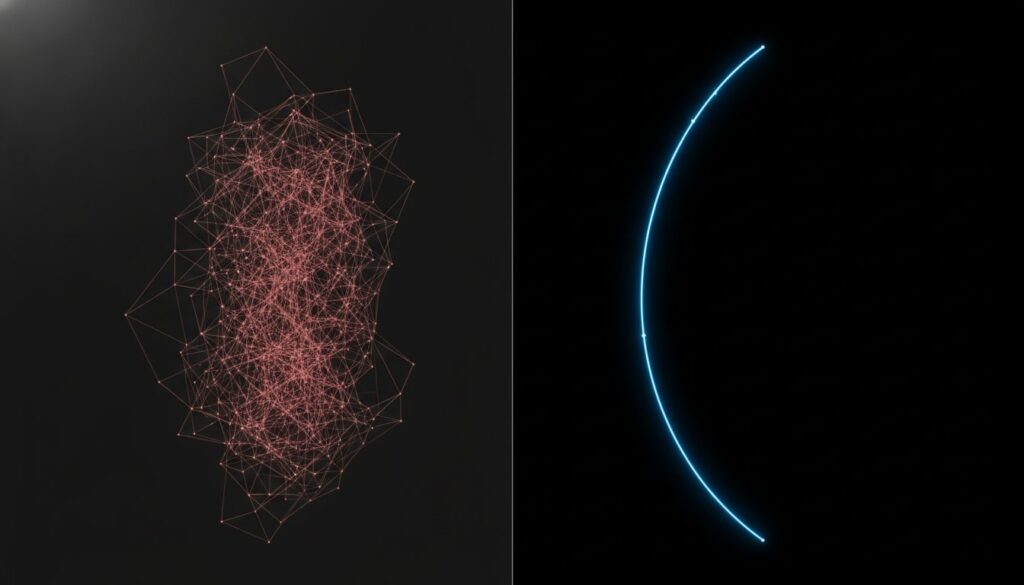
An automated tool might use 5,000 points for a shape that only requires 50. This overload forces vinyl cutters and embroidery machines to process excessive data, leading to physical “stuttering” during the manufacturing process. You can easily spot a “dirty” file by switching to wireframe view. A professional file looks like a clean, logical skeleton. An auto-traced file looks like a solid mass of black nodes. This bloat slows down design software and increases the risk of file crashes during high-capacity jobs.
Color Overlaps and Inaccurate Layering
Software often uses a “stacking” method where colors are layered on top of each other. This violates the technical standards of a clean Vector Format, which ideally requires distinct, non-overlapping paths. In screen printing, stacking causes registration issues and thick, unwearable ink deposits. Auto-traced files are notoriously difficult to edit because the color paths are fragmented into hundreds of tiny pieces. Manual redrawing ensures that every color layer is a solid, manageable shape that “butts” against the next color perfectly.
Manual Redrawing vs. Auto-Tracing: A Production Comparison
Software logic prioritizes speed over structural integrity. When an algorithm traces an image, it interprets color transitions as mathematical boundaries without understanding the object’s purpose. A human designer, however, uses artistic interpretation to “see” the intended shape. If a logo’s corner is blurred in the source file, a human knows it should be a sharp 90-degree angle. Software simply follows the blur, creating a rounded, imprecise mess. This human insight is the only way to eliminate common vector tracing errors that occur when machines guess at design intent.
Path optimization is another area where manual work excels. A professional artist creates the fewest number of points possible to achieve maximum smoothness. This results in clean Bezier curves that remain fluid at any scale. While automated tools might generate thousands of points to define a simple curve, a manual redraw uses three or four. This streamlined approach ensures the file is production-ready for demanding manufacturing environments. It’s the difference between a file that works and one that crashes your system.
The “free” price tag of automated tools is often a mirage. When you factor in the time spent cleaning up jagged paths or fixing color overlaps, the cost of “free” software rises quickly. Manual redrawing delivers a finished product that requires zero revisions. It’s a proactive investment in your workflow. By getting it right the first time, you avoid the hidden expenses of production delays and rejected art files. Businesses serious about brand consistency should explore the commercial and technical advantages outlined in this comprehensive guide to professional vector artwork to understand what truly production-ready files require.
Precision in Pathing and Bezier Curves
Manual redrawing ensures perfectly straight lines and symmetrical curves that algorithms can’t replicate. This precision is essential for a high-quality low resolution image to vector conversion. A human designer can reconstruct missing parts of a logo that software ignores. If a pixelated edge obscures a font’s serif, a designer researches and restores it. This level of detail ensures that your brand remains consistent and professional across all media.
Scalability Limits of Automated Files
An auto-traced file might look acceptable at business card size, but it fails the “billboard test.” When enlarged, the “crunchy” edge phenomenon becomes painfully obvious. These small inconsistencies in the paths turn into glaring common vector tracing errors when scaled up. Manual redrawing provides the mathematical foundation needed for infinite resolution. Whether it’s for a social media icon or a massive physical display, manual precision ensures your artwork remains crisp and professional. A thorough understanding of what makes a truly scalable image in vector format production-ready can save your team from costly reprints and rejected files at scale.
How Vector Errors Sabotage Your Production Workflow
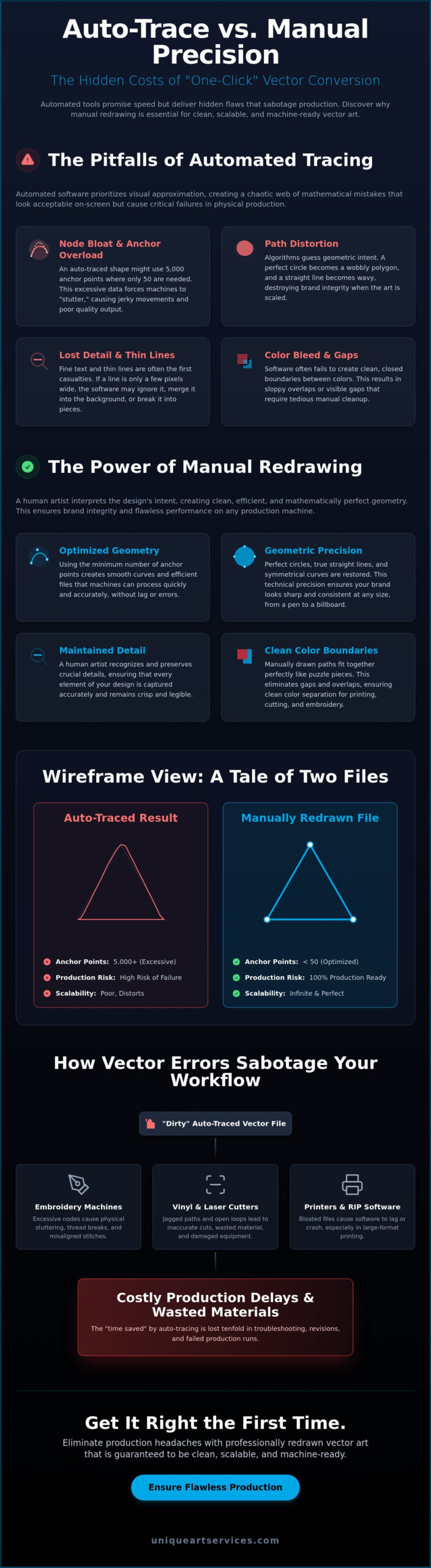
Technical flaws in a digital file don’t stay digital. They eventually manifest as physical failures on the production floor. When you send a file riddled with common vector tracing errors to a manufacturer, you aren’t just sending a design; you’re sending a set of faulty instructions. These errors act as hidden roadblocks that stall machinery, waste materials, and erode your profit margins. A “dirty” file leads to a “dirty” finished product, and in a high-volume environment, these inefficiencies accumulate rapidly.
Machine downtime is perhaps the most expensive consequence of poor vectorization. Hardware like vinyl cutters and CNC routers must process every single node in a file. If an auto-traced logo contains thousands of unnecessary anchor points, the machine’s processor can become overwhelmed. This leads to “stuttering,” where the tool head pauses or moves erratically, resulting in jagged physical cuts and potential hardware wear. Production slows to a crawl while your equipment struggles to interpret a chaotic mathematical mess.
Beyond the technical glitches, distorted logos directly impact customer trust. When a brand’s signature mark looks “off”—whether through wavy lines that should be straight or irregular curves—it signals a lack of professionalism. Brand integrity depends on consistency across all media. If your apparel looks different from your signage because of automated software failures, your brand’s perceived value drops. High-quality production requires a stable, precise backbone that only manual redrawing can provide.
Embroidery and Stitch File Compatibility
There’s a direct, uncompromising link between clean vector paths and superior embroidery digitizing results. In digitizing software, vector nodes often dictate where stitch points are placed. Excessive nodes from an auto-trace create a dense, “bulletproof” stitch count that can break needles or pucker the fabric. You can avoid frequent thread breaks and bird-nesting by starting with high-precision converting pictures to vector format workflows. Clean geometry ensures the embroidery machine moves fluidly, producing a soft, wearable finish.
Large-Format Print Failures
Large-scale signage leaves no room for error. Automated tracing frequently fails to maintain exact CMYK or Pantone color matches, leading to “stepped” gradients and visible color shifts when printed at size. Screen printers often reject auto-traced files because of “halos”—tiny gaps between colors that appear when the software doesn’t properly butt-fit the paths. Manual redrawing is a necessity for promotional products and apparel to ensure every color layer sits perfectly against the next. Ensure your next project is production-ready by choosing our expert professional vector art services today.
First-Time-Right Vector Solutions with Unique Art Services
Eliminating common vector tracing errors requires more than just a software update; it demands a commitment to manual craftsmanship. Unique Art Services has spent 15 years perfecting the art of precision vector conversion. Our “Manual Only” Guarantee is the foundation of our business model. We never use automated tracing tools. This ensures that every path we create is deliberate, optimized, and geometrically sound. This dedication to quality is why we maintain a 99% first-time-right rate for our global clients.
Efficiency is the heartbeat of modern production. We understand that your workflow depends on speed as much as accuracy. That’s why we offer a 12-hour standard turnaround for all orders. When deadlines are critical, our 4-hour rush processing ensures your machines keep moving without interruption. We operate as a stable backbone for your business, providing the technical expertise needed to transform problematic art into production-ready assets. Our process removes the friction that typically stalls creative projects.
A Global Specialist for High-Volume Needs
Our reach extends across major creative hubs in the US, UK, and Australia. We provide 24/7 reliability to accommodate global production schedules, ensuring a seamless input-output flow regardless of your time zone. Our team handles everything from simple logos to complex anime digitizing projects. We specialize in detailed character art that automated software simply cannot interpret. By integrating with your existing team, we remove design bottlenecks and let you focus on your core commercial objectives.
Ready to Scale Your Brand?
Scaling your business requires assets that work everywhere, every time. Our flat-rate pricing model removes the guesswork from your budgeting process. We encourage a “production-first” mindset. This means every piece of branding is built for its final physical application rather than just a digital preview. This proactive approach prevents common vector tracing errors from ever reaching your production floor. It’s time to stop fighting with “dirty” files and start working with precision geometry. Get your production-ready vector art from Unique Art Services and experience the difference that 15 years of manual expertise makes.
Secure Your Production with Precision Geometry
Relying on automated software might save minutes today, but it often costs hours of troubleshooting tomorrow. Technical pitfalls like node bloat and path distortion aren’t just visual flaws; they’re structural failures that stall machinery and compromise brand integrity. Identifying and avoiding common vector tracing errors is the first step toward a more efficient, professional workflow. Manual redrawing remains the only reliable way to ensure your artwork is truly production-ready for embroidery, print, and large-scale applications. By prioritizing clean, mathematical paths over algorithmic guesses, you protect your business from unnecessary friction and costly revisions.
Unique Art Services provides the stability and expertise your brand needs to scale with confidence. With over 15 years of industry experience, we maintain a 99% first-time-right rate, ensuring your files work perfectly the moment they hit the production floor. When deadlines are tight, our 4-hour rush order processing keeps your projects on schedule without sacrificing precision. Eliminate production errors with professional vector art conversion and give your creative assets the crisp, scalable foundation they deserve. Your brand is ready for the next level of professional quality.
Frequently Asked Questions
What is the most common error in automated vector tracing?
The most common error in automated tracing is node bloat, where software creates thousands of unnecessary anchor points to define a simple shape. This occurs because the algorithm attempts to match every pixel fluctuation rather than identifying the geometric intent. These common vector tracing errors lead to sluggish file performance and physical stuttering in production machinery like vinyl cutters or CNC routers.
Why is my vector file so large after using an auto-trace tool?
Your vector file is large because automated tools generate an excessive amount of mathematical data by over-plotting paths. Every anchor point and its associated handles add to the total file size. While a manually drawn logo might use 50 points, an auto-traced version can easily exceed 2,000 nodes. This bloat causes design software to lag and increases the risk of crashes during production.
Can I fix a jagged vector file without redrawing it?
You cannot reliably fix a jagged vector file using automated smoothing filters without compromising brand integrity. While software offers “Simplify” or “Smooth” sliders, these tools often round off corners that should be sharp or distort symmetrical curves. Manual redrawing is the only professional solution to restore geometric precision and ensure the file is production-ready for all media formats.
How many anchor points should a professional vector logo have?
A professional vector logo should have the minimum number of anchor points required to maintain smooth, accurate curves. For a standard corporate mark, this often means fewer than 100 points in total. High-precision manual work focuses on placing nodes only at the extreme ends of curves and at corner intersections. This lean structure ensures maximum scalability and compatibility with specialized manufacturing hardware.
Why do print shops prefer manual vector redrawing over software tracing?
Print shops prefer manual redrawing because it eliminates the technical pitfalls that lead to rejected art files. Manual files feature clean, butted color paths that prevent “halos” or gaps during the printing process. These professionally prepared assets avoid the common vector tracing errors that cause registration problems in screen printing or messy gradients in large-format signage production.
Is vector format the same as SVG or EPS?
Vector format is a general category of digital art, while SVG and EPS are specific file extensions used to store that data. SVG is a modern, web-standard format defined by XML code. EPS is a legacy format frequently used in professional print workflows. Both rely on mathematical coordinates rather than pixels to maintain infinite resolution at any scale or size.
Can low-resolution JPEGs be converted into high-quality vectors?
Low-resolution JPEGs can be converted into high-quality vectors, but only through manual reconstruction by a skilled designer. Automated software will simply trace the pixelated, blurry edges, resulting in a jagged and unusable vector. A professional artist uses the low-res image as a guide to manually plot sharp paths that restore the logo to its original intended quality. For a deeper understanding of industry best practices and file format standards, the 2026 guide to professional vector artwork covers the full spectrum of scalable design and conversion workflows.
How long does it take to manually redraw a logo into vector format?
Manually redrawing a logo typically takes between 4 and 12 hours depending on the complexity of the original artwork. Simple geometric marks are processed quickly, while intricate character art or detailed crests require more time for precise pathing. Professional services offer rush processing to meet tight production deadlines, ensuring high-quality files are ready for manufacturing without significant delays.