
Vectorizing Art: The Professional Guide to Scalable Graphics in 2026
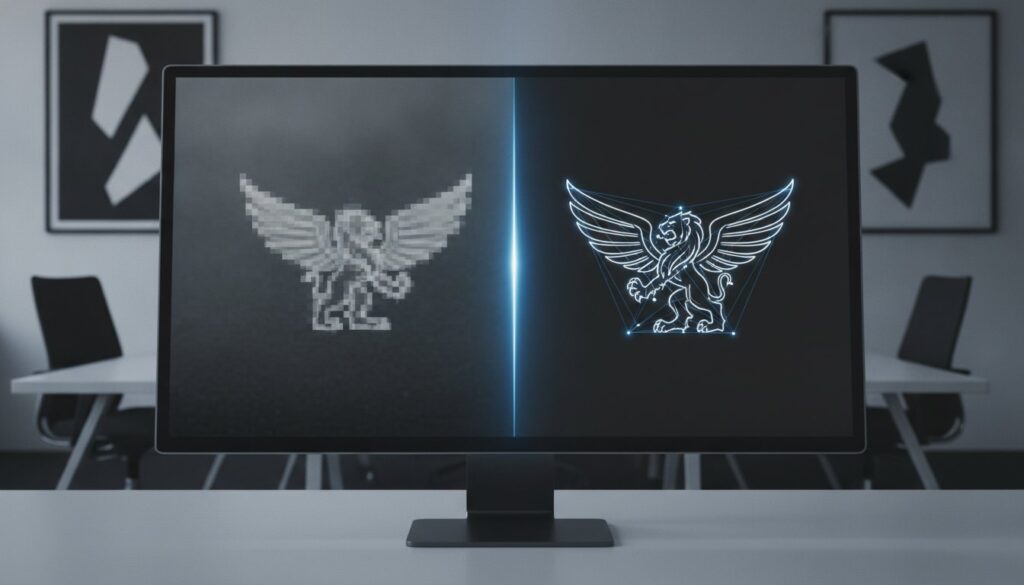
You finally secure a high-profile billboard placement, but when the proof arrives, your sharp brand logo looks like a staircase of blurry, pixelated squares. It’s a frustrating reality for many businesses trying to scale their visual identity. Most professionals have experienced the headache of a screen printer rejecting a low-resolution file or an auto-trace tool creating jagged, unprofessional lines that require hours of manual cleanup.
We understand that your brand’s reputation relies on visual precision. By vectorizing art, you transform these low-quality images into high-precision, production-ready files that remain crisp at any size. This process is a mathematical reconstruction rather than a simple digital filter. In this guide, we’ll explore the 2026 environment of scalable graphics, including the latest AI-assisted tools in Adobe Illustrator 30.5 and the critical importance of manual redrawing for professional results. You’ll learn the exact raster-to-vector workflow needed to ensure your designs are always crisp, professional, and ready for any print or digital application.
Key Takeaways
- Understand the technical transition from pixel-based images to mathematical paths to achieve infinite scalability without quality loss.
- Discover why manual redrawing is superior to automated “auto-trace” tools for creating clean, production-ready files.
- Learn why vectorizing art is a non-negotiable prerequisite for specialized industries like screen printing and embroidery.
- Achieve smaller file sizes and sharper graphics that maintain absolute clarity on any medium, from business cards to billboards.
- Explore professional workflows that deliver high-precision results within hours to meet demanding production deadlines.
What Does Vectorizing Art Actually Mean?
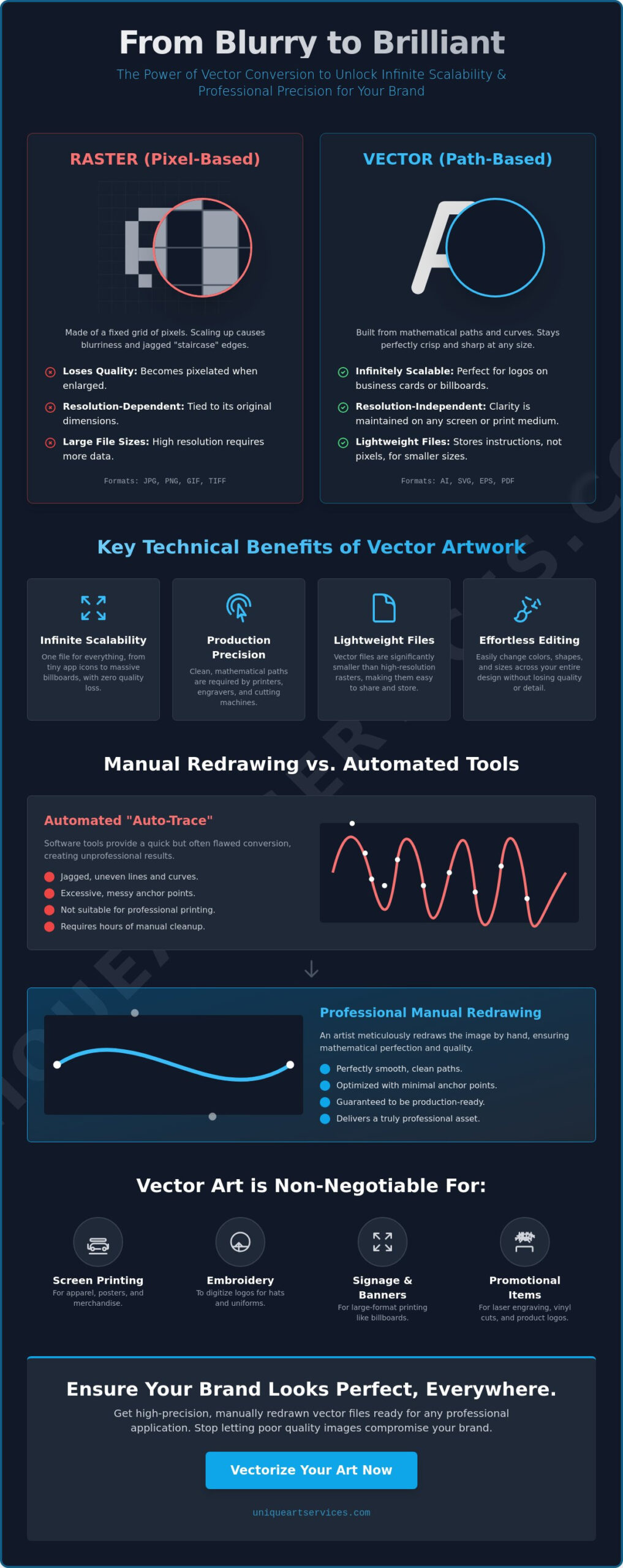
Vectorizing art is the technical process of converting pixel-based raster images into path-based vector graphics. Think of a standard digital photograph or a JPEG logo. These files are essentially a complex mosaic of colored squares. When you zoom in, the image eventually breaks apart into a blurry mess. Vectorization replaces this mosaic with a system of mathematical coordinates and Bezier curves. Instead of storing information about every individual pixel, the file stores instructions on how to draw the lines, shapes, and colors.
Resolution independence is the primary goal of this transformation. In a professional setting, a logo shouldn’t just be a “picture” of a brand mark. It needs to be a “blueprint.” While a picture is static and limited by its original size, a blueprint provides the structural data required to recreate the image at any scale. Through the process of Image tracing, designers reconstruct these visual elements to ensure they remain mathematically perfect regardless of the output size.
The Core Difference Between Raster and Vector
Raster images, such as JPEGs or PNGs, rely on a fixed grid of colored pixels. If you have a small logo file, that is all the data available to your computer. When you try to stretch that grid, the software has to guess how to fill the gaps. This results in the “pixelated staircase” effect where edges look blocky and blurred. Vector graphics use a completely different logic. Formats like AI, EPS, and SVG use mathematical paths between anchor points. By vectorizing art, you move away from these rigid grids and toward smooth, infinite curves that retain their integrity at any magnification.
Why Traditional Resizing Fails Without Vectorization
Simply “upscaling” a raster file in a photo editor doesn’t create new detail. It uses interpolation, which often introduces artifacts and muddy edges. For brand assets, this loss of definition is unacceptable. A logo that looks fine on a business card will fail on a vehicle wrap if it hasn’t been properly vectorized. Professional printers require specific vector file formats because they need the clean, mathematical paths to guide their equipment. Without this precision, you risk production delays and rejected files. High-quality output starts with clean, scalable data that vectorizing art provides.
The Technical Benefits of Vectorizing Your Artwork
The advantages of vectorizing art extend far beyond simple aesthetics. While raster images are trapped by their original resolution, vector files offer absolute freedom. This technical shift allows a single graphic to scale infinitely without a hint of blurriness or distortion. Beyond visual clarity, vectorization provides essential compatibility with computer-aided manufacturing (CAM). If you need to send a logo to a vinyl cutter or a CNC machine, these devices require the specific coordinate-based data that only a vector path can provide.
Efficiency is another major factor in professional workflows. High-resolution bitmaps often result in massive file sizes that slow down digital collaboration and clog servers. In contrast, a vector file remains lightweight because it stores mathematical instructions rather than millions of individual pixels. This format also simplifies color management. You can swap brand colors instantly across an entire design suite without the tedious masking or re-coloring required in raster editors.
Resolution Independence for Modern Branding
Modern brands must exist in dozens of environments simultaneously. You need a file that performs as well on a tiny mobile app icon as it does on a massive stadium billboard. By vectorizing art, you create a single, master asset that ensures brand consistency across every touchpoint. This approach also future-proofs your visual identity. As display technologies evolve and screen resolutions increase, your vector-based assets will remain sharp while older raster files begin to look dated and soft.
Clean Paths and Mathematical Precision
When you start with a scan or a low-quality photograph, the image often contains digital noise and artifacts. Vectorization removes these imperfections by replacing them with clean, calculated paths. Every sharp corner and perfect circle is defined by strategically placed anchor points. This precision is vital when preparing vector art for promotional products, where even minor jaggedness can ruin a print run.
Understanding What is vector art? helps clarify why these mathematical paths are the gold standard for professional production. If you are struggling with low-quality assets, consider having a professional convert your logo to vector to ensure it meets these technical standards. By focusing on path efficiency and node placement, you eliminate the technical friction that often stalls creative projects.
Manual Redrawing vs. Automated Vectorizing Tools
One-click solutions are tempting in a fast-paced production environment. Many users rely on “auto-trace” features, thinking they’ve found a shortcut to high-quality graphics. However, these automated tools often lead to production disasters. Algorithms see pixels, not design intent. When vectorizing art through an automated process, the software attempts to outline every stray pixel and compression artifact. This results in “wonky” curves and thousands of unnecessary anchor points that make the file difficult to edit and nearly impossible to use for precision manufacturing.
Manual redrawing is the professional alternative. It involves a skilled designer hand-placing every anchor point to recreate the original image. This method prioritizes path efficiency. A clean vector file uses the minimum number of nodes required to define a shape. Fewer nodes mean smoother curves and smaller file sizes. Manual redrawing also allows for the sophisticated handling of gradients and complex shadows. Instead of the “banded” look produced by auto-tracers, a human designer can create smooth transitions that translate perfectly to print. Understanding these technical nuances is essential when exploring common uses for vector art across different media.
Why Auto-Tracers Often Fail in Production
Automated output frequently suffers from jagged edges that only become visible when the graphic is enlarged for a sign or banner. Another common issue is the “white gap” problem. Auto-tracers often create overlapping paths or leave tiny slivers of empty space between shapes. While these might not show up on a computer screen, they cause major errors in physical production. Embroidery machines may create bird’s nests of thread, and vinyl cutters might double-cut lines, ruining the material. If you’re vectorizing art for these applications, automated tools simply don’t provide the reliability required for a professional result. A deeper look at the raster to vector conversion process reveals exactly why automated tracing creates more technical debt than it solves for production-critical files.
The Human Element: Pathing and Visual Logic
A designer brings visual logic to the process that software cannot replicate. When redrawing a logo, an expert understands which lines should be perfectly horizontal, vertical, or symmetrical. They can correct perspective issues or slight misalignments found in the original low-resolution scan. This proactive problem-solving ensures a “first-time-right” result. By choosing manual conversion over automated shortcuts, you remove the friction from your creative workflow and provide your production partners with a file they can actually use without further modification.
Industry Use Cases: When Vector Art is Non-Negotiable
In many sectors, vectorizing art is the difference between a successful production run and a costly mistake. While a high-resolution raster file might suffice for a basic social media post, industrial manufacturing requires the mathematical certainty of paths. Machines used in screen printing, laser engraving, and sign making cannot “read” pixels. They require clean, closed loops and precise coordinates to guide their tools. Without these files, production stalls, and the risk of error increases exponentially.
Screen Printing and Apparel Manufacturing
Screen printing relies on the creation of crisp film positives for each color in a design. Vector files allow for effortless spot color assignments using the Pantone Matching System. This ensures that the red on your shirt perfectly matches the red in your brand guidelines. Additionally, vectorizing art allows designers to monitor line weights. If a line is too thin, it won’t hold ink during the printing process. This technical preparation is also the essential first step for embroidery digitizing. A digitizer needs the clean paths of a vector file to accurately map out stitch directions and densities.
Large-Format Graphics and Environmental Design
When you scale a graphic for a billboard or a full vehicle wrap, the flaws in a raster image become magnified. A vector file ensures that your branding looks sharp whether viewed from 100 yards or 10 inches. This is vital for maintaining professional standards in environmental design. Large-scale print shops demand AI or EPS formats because these files handle massive dimensions without increasing file size or distorting aspect ratios. If you are preparing for a major event or outdoor advertising campaign, you can order professional vector art to guarantee your graphics are production-ready from day one.
Promotional products like pens, mugs, and hardware also require vector precision. Pad printing and laser engraving use the paths within a vector file to guide the application of ink or the movement of a laser. Because these products often have very small print areas, any jaggedness in the original art will be immediately noticeable. By starting with a clean vector file, you ensure that every etched logo or printed name is legible and sharp, regardless of how small the final product may be.
Achieving Professional Results with Unique Art Services
Precision in vectorizing art requires more than just the right software; it demands a deep understanding of production requirements. Unique Art Services brings a 15-year legacy of manual redrawing expertise to every project. We recognize that automated tools often fall short of professional standards. Because we are committed to manual precision, we never use auto-tracing shortcuts. Every anchor point is hand-placed by a specialized designer to ensure your files are structurally sound and ready for immediate use in manufacturing.
Speed is a cornerstone of our service model. We offer a 12-hour standard delivery window to keep your projects moving forward. For urgent deadlines, our ultra-fast 4-hour rush processing ensures you never miss a production slot. Our global service hubs operate strategically to provide round-the-clock support. This infrastructure allows us to handle high volumes while maintaining the personal attention to detail that your brand deserves.
The Unique Art Services Workflow
Our process begins with a thorough technical analysis of your original raster file. We identify potential issues like low-contrast edges or complex gradients before the redrawing begins. A specialized designer then reconstructs the artwork from scratch, focusing on path efficiency and node placement. Finally, every file undergoes a rigid quality check. This methodical approach allows us to maintain a 99% first-time-right rate, saving you the time and frustration of multiple revisions.
Scalable Solutions for High-Volume Needs
We serve as a stable backbone for print shops and promotional agencies that require high capacity and predictable results. Managing large volumes of artwork can be a bottleneck for growing businesses. Our team removes this friction by providing consistent quality at scale. We utilize transparent flat-rate pricing, which allows you to calculate your production costs with total predictability. There are no hidden fees or complex quotes to navigate. Ready to start? Get your art vectorized by professionals today and experience the difference that 15 years of technical expertise makes for your brand.
Secure Your Visual Identity for 2026 and Beyond
Professional branding requires more than just a visually appealing logo; it demands technical reliability. The process of vectorizing art is a fundamental step in moving from static pixels to scalable, production-ready assets. By choosing manual redrawing over automated shortcuts, you eliminate the technical friction that often leads to rejected files and costly printing errors. Whether you’re preparing for a massive billboard campaign or fine-tuned embroidery, path precision remains the industry standard for quality.
Unique Art Services provides the stability your creative workflow needs. With over 15 years of manual redrawing expertise, our team ensures your graphics are mathematically perfect and ready for any manufacturing process. We deliver standard orders within 12 hours, with 4-hour rush processing available for your most urgent deadlines. Our commitment to accuracy has resulted in a 99% first-time-right rate, allowing you to focus on your business while we handle the technical details.
Transform your blurry art into professional vector graphics now and experience the efficiency of working with a global specialist. It’s time to stop settling for pixelated results and start building a brand that scales effortlessly across every medium.
Frequently Asked Questions
What is the best file format for vectorizing art?
The industry standard file formats for vector art are AI, EPS, and SVG. Adobe Illustrator (AI) files are the preferred choice for professional design and print production due to their deep integration with creative suites. Encapsulated PostScript (EPS) offers broad compatibility across various software platforms, while Scalable Vector Graphics (SVG) is the primary standard for web applications in 2026. These formats store mathematical paths rather than pixels, ensuring your graphics remain sharp at any scale.
Can any image be converted into a vector?
Almost any digital image can technically undergo the process of vectorizing art, but the visual results vary based on the original content. Clean logos, hand-drawn sketches, and sharp line art convert perfectly into crisp vector paths. Complex photographs can also be vectorized, though they will typically take on a more stylized or “posterized” appearance rather than looking like a realistic photo. High-contrast images with clear boundaries always yield the most precise professional results.
How much does it cost to vectorize a logo professionally?
Professional vectorization costs generally depend on the complexity of the original artwork and your required turnaround time. A simple logo with clean lines and minimal text requires less labor than a complex, hand-drawn illustration with intricate detail or overlapping gradients. Most professional services provide flat-rate pricing based on these difficulty levels. This predictable cost structure helps businesses manage their production budgets while ensuring they receive high-quality, production-ready files for their branding needs.
Why can’t I just save a JPEG as an AI file?
Simply changing a file extension from .jpg to .ai does not convert the underlying image into a vector. This action merely places a pixel-based raster image inside a vector “container.” The file will still look blurry when enlarged because the internal structure remains a fixed grid of pixels. To achieve true scalability, a designer must manually redraw the image using mathematical paths and anchor points to replace the original pixel data entirely.
How long does professional vector art conversion take?
Professional vector art conversion typically takes between 4 and 12 hours depending on your specific project deadline. Standard delivery often falls within a 12-hour window, which is ideal for most branding and production schedules. If you are facing an immediate manufacturing deadline, rush processing can deliver a finalized, production-ready file in as little as 4 hours. This speed ensures that your print or embroidery projects remain on track without compromising on technical quality.
What is the difference between vectorizing and digitizing?
Vectorizing creates mathematical paths for print and digital scaling, while digitizing creates specific stitch instructions for embroidery machines. Vectorizing art is often the essential first step before the digitizing process begins. A vector file defines the shapes and colors of a design, which a digitizer then uses to map out stitch directions, densities, and path types. While both involve digital transformation, they serve entirely different production environments and use different software logic.
Will vectorizing my art change the colors?
Professional vectorization shouldn’t change your colors; it actually allows for more precise color control across different media. During the redrawing process, designers can match your original colors to specific Pantone (PMS) codes or CMYK values for print consistency. If your original file is low-quality or has faded colors, vectorization can even help restore the intended vibrancy. This ensures that your brand colors remain uniform across all physical and digital marketing materials.
Do I need special software to view vector files?
You don’t necessarily need specialized software just to view a vector file, as most modern web browsers can open SVG files directly. However, to edit or manipulate formats like AI or EPS, you will need professional software such as Adobe Illustrator or CorelDRAW. Many services also provide a high-resolution PDF or PNG preview alongside the vector file. This allows you to inspect the artwork on any device without installing professional design suites or specialized creative tools.