
Vector Art for Promotional Products: The Essential Guide to Production-Ready Files (2026)
For every dollar spent on branded merchandise, the average return on investment is twelve dollars; however, that value disappears if your logo arrives blurry or distorted. It’s a common frustration to see a design look sharp on a computer screen but fail during the physical manufacturing process. High-quality vector art for promotional products is the essential foundation for any successful campaign. If you’ve ever struggled to explain the difference between a JPG and an EPS to a printer, you aren’t alone. Most business owners want to focus on growth, not file extensions, yet choosing the wrong format often leads to wasted budget and missed opportunities.
You deserve to feel confident that your brand looks its best on every item, from eco-friendly apparel to high-end corporate gifts. This guide will show you why the vector format is a non-negotiable requirement for production and how professional conversion ensures your logo remains crisp at any scale. We’ll explore the technical necessity of these files, explain how to get production-ready assets quickly, and help you maintain total brand consistency across all your physical media.
Key Takeaways
- Understand why math-based paths provide infinite scalability so your logo stays sharp whether it’s on a pen or a billboard.
- Discover how high-quality vector art for promotional products prevents pixelation on textured surfaces like canvas bags and USB drives.
- Learn why essential production methods like screen printing and laser engraving require specific vector paths to guide the equipment.
- Recognize the difference between manual redrawing and auto-tracing to avoid the jagged edges that cause production delays.
- Simplify your workflow by creating a master vector library that ensures your brand looks consistent across every physical medium.
What is Vector Format and Why is it Essential for Promo Items?
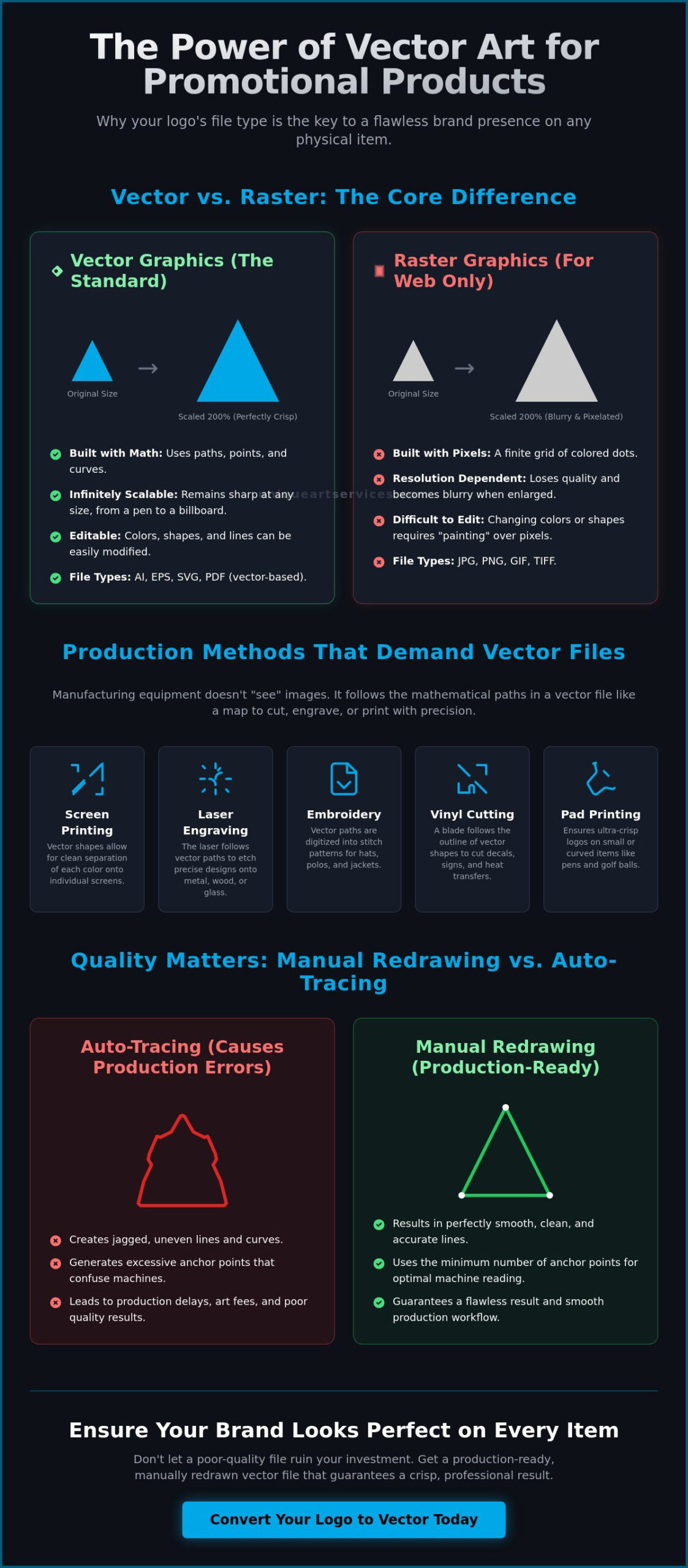
In the fast-paced world of physical branding, your logo’s technical structure determines its final quality. Most digital images you see online are raster files, which are made of a fixed grid of pixels. If you try to stretch these images, they become blurry and lose their professional edge. High-quality vector art for promotional products relies on geometry rather than a grid of dots. Specifically, a vector format is a series of mathematical coordinates rather than a grid of colored squares. This foundational concept of What is Vector Art? allows the artwork to be scaled to any size without losing clarity, ensuring your brand looks as sharp on a billboard as it does on a business card.
The Core Difference: Vector vs. Raster
Raster files like JPEGs or PNGs are resolution-dependent. When you enlarge them, the software “guesses” how to fill in the gaps between pixels, resulting in a fuzzy, pixelated appearance. In contrast, vector graphics use anchor points and paths to define shapes. Whether you’re printing on a small lapel pin or a massive vinyl banner, the lines remain perfectly crisp. Common vector file extensions include AI (Adobe Illustrator), EPS (Encapsulated PostScript), and SVG (Scalable Vector Graphics). It’s a common mistake to think that simply “saving as” a different format fixes the problem. Saving a JPEG as a PDF or an EPS doesn’t create a true vector; it just wraps a low-resolution pixel image inside a vector container. The file must be built or redrawn using paths to function correctly for high-end manufacturing.
Why Printers Insist on Vector Artwork
Print shops and manufacturers require vector files because their equipment needs specific instructions. Modern production machinery, such as laser engravers and vinyl cutters, follows the mathematical paths within a vector file like a map. Without these paths, the machine doesn’t know where to start or stop its cut or engraving. Vector files also simplify the color separation process for screen printing. Since each shape is a distinct object, printers can easily isolate individual colors to create the necessary screens for your apparel or accessories. This precision significantly reduces setup times and helps you avoid expensive art prep fees that shops often charge for fixing low-quality files. Utilizing professional vector art for promotional products ensures your branding remains consistent, your colors stay accurate, and your production stays on schedule. It’s the difference between a project that moves smoothly through the shop and one that gets stuck in a cycle of revisions and additional costs.
How Vector Art Solves Common Promotional Printing Problems
While the infinite scalability discussed earlier is a major benefit, the practical utility of vector files shines most during the actual production run. Using high-quality vector art for promotional products prevents common manufacturing failures that can derail a marketing campaign. One of the most frequent issues occurs when a designer sends a high-resolution raster file, thinking it’s sufficient. In reality, raster edges often “bleed” or appear muddy when reduced to the size of a pen barrel or a USB drive. Vector paths eliminate this uncertainty by providing the printing press with precise coordinates for every stroke.
Production equipment has physical limits. For example, embroidery machines and laser engravers require a minimum line weight to ensure the thread or laser doesn’t overlap or vanish. Vector files allow for easy adjustment of these weights to meet strict Production-Ready File Specifications. Another vital step is converting all fonts to outlines. This process transforms text into geometric shapes, ensuring your logo looks exactly as intended even if the manufacturer doesn’t have your specific brand typeface installed. If your current files aren’t meeting these standards, you can convert your logo to vector format to guarantee a flawless result.
Achieving Crisp Details on Small Items
Small-scale branding, often achieved through pad printing, requires ultra-sharp detail. On curved or small surfaces, any slight blur in a raster image becomes an obvious defect. Clean vector paths ensure that small text remains legible and fine lines don’t merge into a single blob. This precision is especially critical for complex logos on textured materials like canvas bags, where the fabric weave can naturally obscure fine details if the artwork isn’t perfectly defined.
Color Precision and Spot Color Matching
Consistency is the hallmark of a professional brand. Raster files typically rely on CMYK or RGB color models, which can shift significantly between different printers. Utilizing vector art for promotional products allows you to assign specific Pantone (PMS) colors to your design. This ensures that your brand’s signature blue looks identical on a screen-printed t-shirt as it does on a custom-molded silicone wristband. By avoiding raster gradients, you eliminate the risk of “banding” or grainy transitions that often occur in traditional screen printing.
Promotional Product Methods That Require Vector Files
Production equipment operates on logic and coordinates. While a standard office printer might handle a JPEG with ease, industrial manufacturing machines require the specific mathematical data found in vector art for promotional products. These machines don’t “see” an image in the traditional sense; they follow a blueprint. If your file lacks these clean paths, the equipment cannot function correctly, leading to production delays or rejected orders. Professional-grade results depend on providing the machine with instructions it can actually execute.
Several standard branding methods depend entirely on vector data to succeed:
- Screen Printing: The industry standard for apparel and bags. It requires distinct color layers to create physical screens.
- Laser Engraving: High-energy lasers follow vector strokes to etch designs into metal, wood, or glass with extreme precision.
- Pad Printing: This method is the go-to for irregular or rounded surfaces like golf balls and plastic mugs, where path accuracy prevents distortion.
- Vinyl Cutting: A physical blade follows vector lines to cut decals, signage, and heat-transfer vinyl for athletic jerseys.
Screen Printing and Color Separation
In screen printing, each color in your design requires its own mesh screen. Vector files make this separation effortless because each shape is a distinct object with a defined color value. If you provide a raster image, a technician must manually recreate the design to isolate the colors. This process is time-consuming and often results in errors. For multi-color apparel prints, vectors ensure that each layer aligns perfectly. This alignment, known as registration, keeps your design from looking shifted or messy. If you’re expanding your brand into headwear or heavy jackets, you’ll also need to understand The Ultimate Guide to Professional Embroidery Digitizing in 2026 to ensure your logo translates well from ink to thread.
Laser Engraving and Hard Goods
Laser engraving machines interpret vector lines as specific commands. The laser follows the exact stroke of the path to create a permanent mark. Raster images often include shading or soft edges that a laser cannot replicate. Instead of a clean etch, the machine might produce a muddy, scorched area that lacks definition. High-precision vector art for promotional products allows for intricate details on industrial-grade items like stainless steel tumblers or crystal awards. By using clean paths, you ensure the laser moves with maximum efficiency. This results in a crisp, high-contrast mark that won’t peel or fade over time. It’s the most reliable way to maintain a premium feel on hard goods.
Manual Redrawing vs. Auto-Tracing: Avoiding Production Disasters
Automated software tools offer a tempting shortcut for generating vector art for promotional products, but these instant solutions often lead to expensive manufacturing failures. Automated tracing algorithms work by guessing where lines should be based on pixel contrast. This process creates a phenomenon known as the “node problem.” Instead of a smooth, single curve, an auto-traced file generates thousands of unnecessary anchor points. These jagged, unprofessional edges are visible to the naked eye and can cause high-precision printing software to lag or crash during the production phase. For a deeper understanding of why manual precision outperforms automated shortcuts, see our professional guide on vectorizing art for scalable, production-ready graphics.
Beyond aesthetic issues, automated tools frequently leave “open paths.” In a professional vector file, every shape should be a closed loop. Automated tracers often fail to connect these lines, leaving gaps that ruin laser engraving and vinyl cutting. A laser engraver interprets an open path as an incomplete instruction; it may stop mid-etch or create a double line that scorches the material. Professional designers insist on manual recreation for brand-critical logos because it ensures the simplest, cleanest path for the machine to follow. If you want to avoid these technical pitfalls, you can order professional vector art services to secure a production-ready file.
The Hidden Costs of Bad Vector Files
While a free automated tool seems cost-effective, “dirty” files carry significant hidden expenses. When a printer receives a file with thousands of extra nodes or overlapping paths, they must spend time cleaning it up before it can hit the press. Most print shops charge “art prep” fees for this labor, which can quickly exceed the cost of a professional conversion. More importantly, these files often lead to production delays and rejected orders. If a screen-printed run of five hundred shirts comes back with jagged logo edges, the cost of the wasted materials falls on the brand owner. Understanding the true difference between raster to vector conversion through professional manual redrawing versus automated tracing can save your brand from these costly mistakes. A manually redrawn vector is a one-time investment that serves the brand for years, providing a stable asset for every future marketing need.
Unique Art Services LLP: The Manual Advantage
We approach every project with the precision of a global specialist. Our process involves analyzing your original raster image and redrawing every path by hand to ensure absolute accuracy. This human-centric approach allows us to maintain a 99% first-time-right rate, even for complex promotional logos with intricate detail or overlapping colors. We understand the fast-paced nature of the branding industry. That’s why we provide a 12-hour standard turnaround for our vector art conversion services. By choosing manual redrawing over automated shortcuts, you ensure your brand maintains its integrity across every physical medium without the risk of production disasters.
Streamlining Your Workflow with Professional Vector Services
Transitioning from a digital design to a physical product is the final hurdle in your branding journey. To streamline this process, you need a reliable workflow that eliminates technical friction. Preparing your files for professional conversion is straightforward. Simply provide the highest quality raster image available, such as a high-resolution PNG or a clear scan. Our team then transforms those pixels into precise, mathematical paths. This step is the first move toward building a master vector library. This collection of assets ensures your brand remains identical across every vendor and product category, from corporate gifts to event signage.
Tight marketing schedules often demand immediate action. We provide 4-hour rush order processing to help you meet even the most aggressive deadlines. Having high-quality vector art for promotional products ready at a moment’s notice prevents the panic of art prep delays. This readiness also simplifies the move to other services like embroidery digitizing. A clean vector file serves as the ideal blueprint for creating thread paths, ensuring that your logo looks just as sharp in stitches as it does in print.
Building a Production-Ready Brand Kit
Success in promotional marketing requires organization. You should keep EPS, AI, and PDF versions of your logo in one centralized location. Each format serves a specific purpose depending on the manufacturing equipment used. For a deeper look into which format works best for specific applications, see our guide on Vector File Format: The Essential Guide to Scalable Graphics in 2026. Having these files organized saves your team from the stress of searching for assets during a rush promo order, allowing you to approve proofs and start production faster.
Getting Started with Unique Art Services LLP
Our global hubs in the US, UK, and Australia provide around-the-clock support to match your business schedule. We operate with the precision of a high-tech firm, ensuring that every manual redraw meets our strict quality standards. We believe in transparency, which is why we utilize a simple flat-rate fee structure for our vector art conversion services. You don’t have to worry about hidden costs or complex quotes. We are here to act as a stable and trustworthy backbone for your creative projects. Get your production-ready vector art from Unique Art Services LLP today and ensure your brand looks perfect on every item.
Secure Your Brand’s Physical Presence
Ensuring your logo looks flawless on every item is the cornerstone of a professional brand. You now understand that vector art for promotional products is not just a file type; it is the essential mathematical blueprint required for manufacturing precision. By choosing manual redrawing over automated shortcuts, you eliminate the risk of jagged edges and production delays that can drain your marketing budget. A clean, production-ready vector library is a long-term investment that guarantees consistency across every physical medium your brand touches.
With over 15 years of industry experience, our team delivers the precision your business deserves. We provide a 12-hour standard turnaround with 4-hour rush processing available for your most urgent projects. Our 99% first-time-right accuracy rate means you can move straight to production with total confidence. Don’t let low-quality files compromise your brand’s reputation. Order Production-Ready Vector Art Now and let our experts handle the technical details while you focus on growing your business. Your brand is in safe hands.
Frequently Asked Questions
What is vector format and why do I need it?
Vector format uses mathematical paths to define shapes rather than a grid of pixels. You need it because promotional production equipment, like laser cutters and screen printers, requires these precise coordinates to execute a clean design. Without it, your logo will lose clarity when scaled or fail to guide the manufacturing machinery correctly. It ensures your branding remains sharp regardless of the product’s size or material.
Can I convert a JPEG to a vector file for free?
You can use free online auto-tracing tools, but they often produce “dirty” files with thousands of unnecessary nodes. These jagged edges look unprofessional and can crash a printer’s software. For brand-critical items, manual redrawing is the only way to ensure a clean, production-ready result. Investing in professional conversion avoids the extra art prep fees that shops charge to fix automated errors.
What is the best vector file format for promotional products?
Adobe Illustrator (AI) and Encapsulated PostScript (EPS) are the industry standards for physical branding. These formats are universally accepted by manufacturers for everything from apparel to hard goods. While SVG is excellent for digital use, most physical production shops prefer AI or EPS because they handle spot colors and complex layers more reliably. Keeping these versions in your brand kit simplifies the ordering process with any vendor.
Why does my vector file look blurry when I open it?
Your file might look blurry if it’s a raster image “saved as” a PDF or EPS without being redrawn. This doesn’t create true vector art for promotional products; it just places a pixelated image inside a vector-friendly container. Alternatively, some software displays a low-resolution preview to save memory, even if the underlying mathematical data is sharp. Always check if the file contains editable paths to verify its quality.
How long does it take to vectorize a logo for printing?
Professional manual redrawing typically takes about 12 hours for a standard turnaround. If you’re facing a tight marketing deadline, rush processing can deliver a production-ready file in as little as 4 hours. This timeline ensures every path is hand-traced for maximum accuracy before it hits the production floor. Speed shouldn’t come at the expense of precision, which is why manual oversight is vital for complex logos.
Do I need a vector file for embroidery too?
Embroidery requires a specialized digitized file, such as a DST or PES, rather than a standard vector. However, a high-quality vector is the ideal starting point for the digitizing process. It provides the clean lines and distinct color blocks needed to map out efficient thread paths. Starting with a vector ensures the final embroidery matches your original design with high accuracy.
What happens if I use a raster image for screen printing?
Using a raster image often results in blurry edges and “halos” around your design. Because raster files don’t have distinct object layers, the printer must manually separate the colors to create the screens. This adds significant labor time, often leading to additional art prep fees or a complete rejection of the order. High-quality vector art for promotional products eliminates these technical hurdles and ensures color precision.
Is a PDF always a vector file?
A PDF is a container that can hold both raster and vector data. Simply saving a JPEG as a PDF doesn’t transform the pixels into mathematical paths. To be a true vector PDF, the artwork must have been originally created or manually redrawn in vector software before being exported. Printers will often check the internal structure of your PDF to ensure it contains the paths necessary for production.