Raster to Vector Conversion: Professional Manual Redrawing vs. Automated Tracing
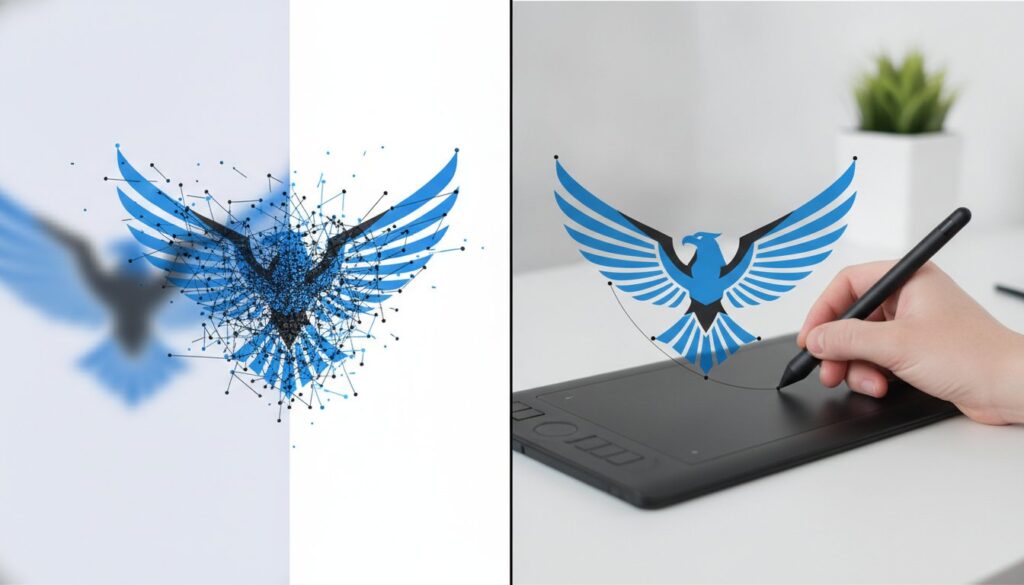
That one-click “vectorize” button in your design software is likely the most expensive shortcut your production department will ever take. You’ve probably felt the frustration of sending a logo to a vendor only to have it rejected because the raster to vector output is a “messy” web of jagged lines and thousands of unnecessary points. When you’re facing blurry or pixelated logos on large-scale prints, a quick automated fix often creates more technical debt than it solves.
We understand that you need crisp, scalable files that work perfectly for everything from screen printing to intricate embroidery. While over 50% of newly launched graphic design tools in 2026 now incorporate AI-powered features, manual redrawing remains the only way to guarantee a file that is truly production-ready. This article explores why professional craftsmanship is the essential choice for maintaining your brand’s integrity. You’ll discover how to secure fast turnarounds without sacrificing the precision your printers demand, ensuring your artwork is flawless every time it hits the production floor.
Key Takeaways
- Learn why raster images fail during enlargement and how vector graphics provide the mathematical precision required for large-scale branding.
- Compare the speed of automated AI tools against the superior accuracy of manual raster to vector redrawing for complex logos and thin lines.
- Understand the technical impact of “dirty” vectors and how excessive anchor points can lead to rejected files and production delays in manufacturing.
- Identify the essential benchmarks for evaluating a conversion service, including the necessity of manual redrawing and flexible 12-hour or rush turnaround options.
- Discover how professional craftsmanship ensures your artwork is 100% production-ready for specialized applications like embroidery and screen printing.
Understanding Raster to Vector: Why Scalability Matters for Your Brand
Every digital asset your brand owns is either a static grid of pixels or a set of dynamic mathematical paths. This fundamental difference determines whether your logo looks professional or amateur when it moves from a computer screen to a physical product. Successful raster to vector conversion isn’t just about changing a file extension; it is about rebuilding your brand’s visual foundation. Quality matters. Precision is non-negotiable.
The Limitations of Raster Images
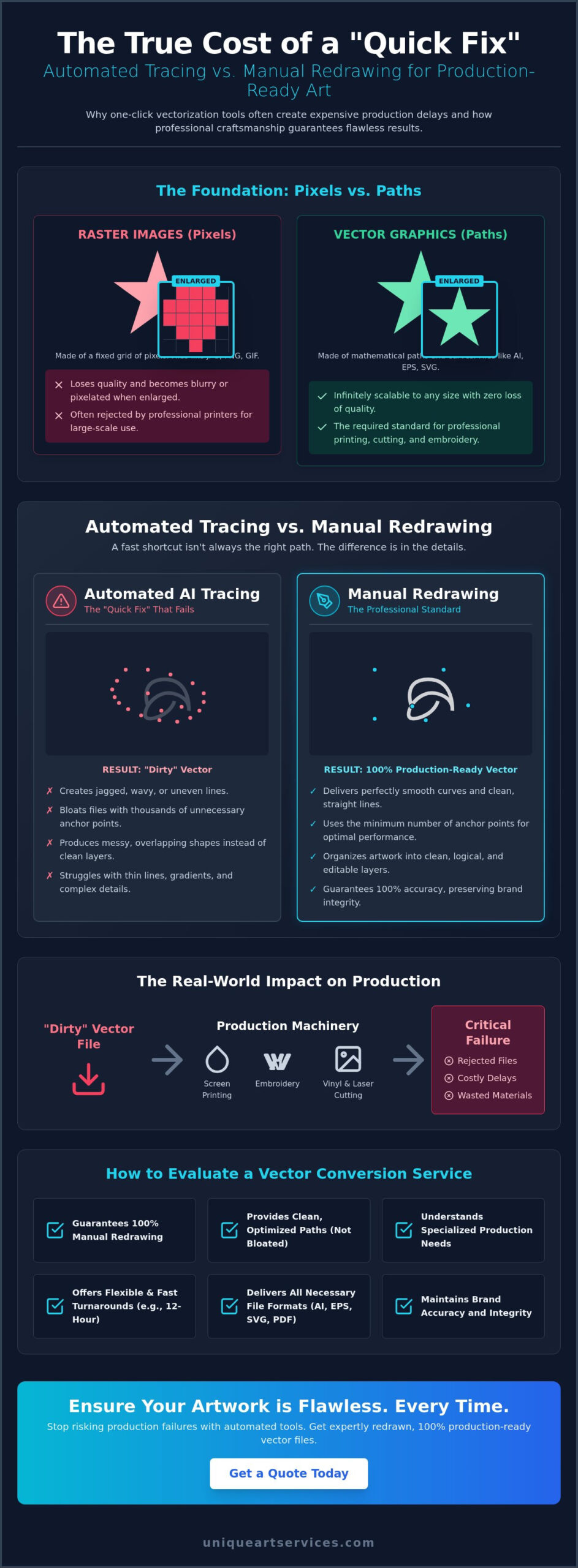
Raster images, such as JPEGs and PNGs, rely on a fixed resolution. When you try to enlarge a low-resolution file for a vehicle wrap or a billboard, the software has to “guess” where to add new pixels. This leads to pixelation, where the edges look jagged, and “artifacting,” which creates blurry, blocky patches around your logo. These imperfections are a major red flag for professional printers. They often reject such files immediately to avoid poor results. Rasterization is the process of turning smooth paths into fixed pixels.
Manual Image tracing solves this by identifying the underlying shapes and redrawing them as clean paths. Without this step, your brand identity becomes inconsistent. A logo that looks fine on a website might look disastrous on a trade show banner. In the fast-paced 2026 manufacturing environment, these delays cost money and damage your reputation with vendors.
The Power of Vector Scalability
Vector graphics are built on mathematical precision. Instead of colored squares, they use Bezier curves to define shapes. Because these shapes are based on math rather than a grid, you can resize them infinitely without losing a single ounce of clarity. Whether you are scaling up for a massive building wrap or down for a tiny promotional pen, the lines remain crisp and the colors stay solid. Various vector file formats like AI, EPS, and SVG provide this flexibility while keeping file sizes incredibly small. This efficiency makes them easy to store and share across global teams. Vectors don’t degrade.
A “production-ready” file in 2026 must meet strict manufacturing standards. Modern hardware for laser cutting, screen printing, and embroidery requires clean, closed paths to function correctly. By prioritizing a high-quality raster to vector workflow, you ensure that your files are ready for any output. This proactive approach removes friction from your creative process and guarantees that your brand looks its best on every medium.
Automated Tracing vs. Manual Redrawing: A Direct Comparison
Speed is often the enemy of precision. While AI-trained vectorizers are becoming more prevalent in 2026, they still struggle with the nuance of professional branding. Automated raster to vector tools offer speed, but they lack the discernment of a professional designer. Automated tools provide instant gratification. Manual redrawing provides production security. The difference isn’t just aesthetic; it’s technical.
The Problem with Automated Tracing Tools
Automated software operates by scanning color clusters and attempting to wrap paths around them. This often results in “shaky line” syndrome, where straight edges become subtly jagged or wavy. These tools also struggle significantly with overlapping colors and gradients. Instead of clean, manageable layers, they create a complex puzzle of tiny, disconnected shapes. You can find technical details on how these algorithms function in Adobe’s Image Trace guide, but the practical outcome is often anchor point bloat. Excessive points can overwhelm vinyl cutters or CNC machines, turning a “free” conversion into a costly hardware delay. Software cannot distinguish between a stray pixel and a deliberate design element.
Why Manual Redrawing is the Gold Standard
A human designer doesn’t just trace; they interpret. They understand that a line should be perfectly horizontal or that a curve should follow a specific geometric arc. This deliberate process of vectorizing art by hand ensures 100% accuracy. Designers can identify and correct text that software might garble into unreadable shapes. For industries like screen printing or embroidery, clean pathing is essential. It prevents ink bleed and ensures that every color separation is crisp and logical. If you need files that work perfectly the first time, a professional vector art service is the most reliable path forward.
Use this framework to decide your next move. Use automation for low-stakes internal drafts or simple, high-contrast shapes that don’t require physical manufacturing. Choose professional manual services for anything intended for physical production, client-facing branding, or large-scale displays. The hidden cost of cleaning up a “dirty” automated file often exceeds the price of getting it done right the first time. Precision saves time. Quality saves money.
The Technical Reality: Why “Dirty” Vectors Ruin Production
“A vector is a vector” is a dangerous assumption for production managers. While the file extension might be .AI or .EPS, the internal geometry determines your project’s success. A “dirty” vector is a file filled with technical errors that automated raster to vector software creates. These errors remain invisible on a high-resolution screen but become catastrophic during physical manufacturing. Software doesn’t understand the physical reality of a printing press or a cutting blade; it only sees shapes.
Automated tracing creates “anchor point bloat.” This happens when software places thousands of unnecessary nodes along what should be a simple, smooth curve. This isn’t just a file size issue. Manufacturing hardware, like CNC routers or laser cutters, must process every single point as a specific instruction. Too many points cause the machine to stutter, leading to jagged cuts, rough finishes, or even hardware crashes. Even specialized fields like GIS mapping face these hurdles; a U.S. Geological Survey report highlights that automated conversion often requires significant manual intervention to reach professional standards. Precision requires human oversight to ensure the machine receives clean, logical instructions.
Impact on Screen Printing and Apparel
Clean paths are the backbone of color trapping and registration. In screen printing, colors must overlap slightly to prevent the garment color from showing through. Automated files often have accidental gaps or microscopic overlaps that don’t align with standard printing plates. This leads to “bleeding” where colors run together or “ghosting” where they don’t meet. Using high-quality vector art for promotional products prevents ink waste and ensures colors sit perfectly on the fabric. A “dirty” vector is often worse than a high-res raster because it provides a false sense of security while delivering a flawed blueprint for the printer.
Precision for Signage and Large Format
Vinyl cutters follow vector paths literally. If your path has a microscopic “zig-zag” because of a poor raster to vector trace, the blade will cut that exact pattern into the vinyl. On a three-inch decal, you might not notice the imperfection. On a six-foot storefront sign, those jagged edges are impossible to hide. Production stops when files are rejected by the shop manager. This leads to missed deadlines and wasted materials. Professional manual redrawing eliminates these risks by ensuring every path is mathematically smooth, closed, and optimized for the specific machine. Understanding the core debate of vector vs raster for logos is essential for any production manager who wants to prevent these costly file rejections before they happen.
How to Evaluate a Raster to Vector Conversion Service
Selecting a partner for raster to vector conversion requires more than a price check. It is a decision that affects your entire production pipeline. A low-quality file leads to rejected proofs and missed deadlines. To protect your brand, you must evaluate potential design partners based on technical rigor and operational reliability. Use the following five steps to audit any service before you commit your brand assets.
Step 1 is to verify their methodology. Demand 100% manual redrawing. If a service relies on automated “one-click” software, they aren’t providing professional art; they’re selling you a shortcut that your printer will likely reject. Step 2 involves benchmarking their speed. In 2026, a 12-hour standard turnaround is the industry benchmark for quality. For urgent marketing crises, look for a 4-hour rush option. This ensures you stay on schedule without compromising the precision of the paths.
Step 3 requires an audit of their file delivery. A professional service should provide a comprehensive package of formats tailored to specific use cases. You need AI files for master editing, EPS for large-format printing, SVG for responsive web design, and PDF for universal viewing. Step 4 looks for crossover expertise. Designers who understand embroidery digitizing bring a higher level of technical awareness to vector art. They understand how physical needles and threads interact with digital lines. Finally, Step 5 is to demand a “first-time-right” quality guarantee. You don’t have time for endless revision cycles.
Key Questions to Ask Your Design Partner
Direct communication reveals a partner’s true capabilities. Ask: “Do you use automated tracing or manual pathing?” If they hesitate, they are likely using software. Ask: “Can you provide files optimized for my specific production method?” A file for a screen printer should be handled differently than a file for a laser engraver. Finally, ask about their revision policy. A reliable partner stands by their work and offers immediate corrections if a file fails a technical print test. If you need 100% manual precision today, you can get a professional vector art quote to start your project.
Understanding Turnaround and Reliability
Reliability is measured by consistency and support. A 12-hour window allows for meticulous quality control while meeting the fast-paced demands of modern business. This timeframe ensures that a senior designer has reviewed every anchor point. Look for services that offer 24/7 global support. Marketing deadlines don’t always follow a standard 9-to-5 schedule. A partner with a 99%+ first-time-right accuracy rate acts as a stable backbone for your creative department. They remove the friction of technical errors, allowing you to focus on your core business objectives.
Precision Redrawing with Unique Art Services: Production-Ready in 12 Hours
Unique Art Services brings over 15 years of specialized expertise to every project we handle. We understand that your brand’s reputation depends on the technical quality of your files. While automated tools have flooded the market, we remain committed to 100% manual redrawing for every raster to vector request. We don’t settle for the “good enough” results of software. Our team treats every logo as a piece of precision engineering, ensuring it meets the rigorous demands of 2026 manufacturing standards. You deserve artwork that works perfectly the first time.
Our Proven Raster to Vector Workflow
Our process begins with a deep technical analysis of your source artwork. We don’t just trace lines; we determine the most efficient pathing strategy for your specific production needs. Expert designers then manually redraw your file using precision Bezier curves. This human touch allows us to interpret overlapping shapes and complex typography that AI often garbles. Every project undergoes a multi-stage quality check to eliminate “dirty” paths, unnecessary anchor points, or technical bloat. This methodical approach guarantees a clean, scalable file that your vendors will appreciate. We turn your low-resolution challenges into production-ready assets.
Efficiency is the core of our operation. We offer a standard 12-hour turnaround to keep your projects moving at a professional pace. If you’re facing a critical marketing deadline, our 4-hour rush order processing provides an immediate solution without sacrificing quality. We act as a high-capacity extension of your design team, providing the speed of a tech firm with the soul of a craft studio. Reliability isn’t just a goal; it’s our standard operating procedure.
Ready to Scale Your Brand?
One of our most significant advantages is the seamless integration between our vector art and embroidery digitizing services. Most conversion firms treat these as separate worlds. We understand that a clean vector file is the essential first step for high-quality embroidery. By choosing a partner who masters both, you ensure that your brand remains consistent across screen printing, promotional products, and apparel. We remove the friction from your creative and production processes, acting as the stable backbone for your promotional business. Don’t let technical errors stall your growth. Get your production-ready vector art from Unique Art Services today.
Secure Your Brand’s Visual Future with Production-Ready Files
Precision in branding isn’t a luxury; it’s a technical requirement for any growing business. You’ve seen how automated tools often fail to handle the complexities of real-world manufacturing, leaving you with “dirty” files that printers reject. Choosing professional manual raster to vector conversion eliminates the risk of jagged lines and anchor point bloat. It’s the only way to ensure your logo remains crisp on everything from a business card to a massive billboard. Getting the foundation right allows your brand to scale without technical friction.
Unique Art Services provides the reliable backbone your creative department needs to succeed. With 15+ years of professional design experience and a 99% first-time-right accuracy rate, we guarantee that your files are ready for immediate production. We understand the pressure of tight deadlines, which is why we offer 4-hour rush processing alongside our standard 12-hour delivery. Our team is dedicated to craftsmanship that saves you time and protects your professional reputation.
Get Your Production-Ready Vector Art in 12 Hours
We’re ready to help you transform your artwork into a permanent, scalable asset that your team can use with confidence. Let’s get to work.
Frequently Asked Questions
What is the difference between raster and vector images?
Raster images are composed of a fixed grid of pixels, while vector graphics are built using mathematical paths. This means rasters like JPEGs lose quality and become blurry when you enlarge them. Vector files remain perfectly crisp at any size because their shapes are recalculated mathematically. This scalability makes vectors essential for professional branding and manufacturing.
Can I convert a low-resolution JPG to a high-quality vector?
Yes, you can transform a low-resolution JPG into a high-quality vector through manual redrawing. A professional designer uses your original file as a guide to plot new, clean paths from scratch. This process restores lost detail and ensures the final artwork is sharp and scalable. It is the most reliable way to salvage old or small logo files for modern use.
Why do printers always ask for vector files instead of JPEGs?
Printers require vector files because they provide the precise geometric data needed for manufacturing equipment. Unlike JPEGs, which are just clusters of color, vectors define clear boundaries for ink placement or blade movement. This precision prevents “bleeding” in screen printing and ensures smooth cuts in vinyl signage. A high-quality raster to vector conversion removes the guesswork for your production team.
How long does a professional raster to vector conversion take?
A professional raster to vector conversion typically follows a 12-hour standard window to ensure thorough quality control and manual precision. This timeframe allows designers to review every anchor point for accuracy. If you are facing an immediate marketing deadline, rush processing can deliver a production-ready file in as little as 4 hours. Reliability and speed are both achievable with the right design partner.
Is automated tracing software good enough for logo design?
Automated tracing is usually insufficient for professional logo design because it produces “dirty” paths with excessive anchor points. These files lack the geometric perfection of manual redrawing and often cause hardware errors during printing or cutting. While software is fast, it cannot replicate the clean curves and logical layers that a human designer creates for high-stakes branding. If you’re unsure which format your logo requires, reviewing a comprehensive guide to vector vs raster for logos can help you make the right decision before sending files to a vendor.
What file formats should I expect from a professional vector service?
You should receive a versatile package of formats, including AI, EPS, SVG, and PDF. The AI file serves as your master editable document, while EPS is the industry standard for large-format printing. SVG is ideal for responsive web graphics, and PDF allows for easy viewing across all devices. This variety ensures your brand is ready for any digital or physical application.
Can you vectorize a photo of a person or landscape?
Yes, photos can be vectorized, though the final result will be a stylized illustration rather than a photographic image. This technique converts complex color gradients into distinct, manageable shapes. It is a popular choice for creating artistic apparel designs, posters, or unique brand mascots. The result is a clean, scalable graphic that maintains the essence of the original photograph.
How much does it cost to have a logo redrawn into vector format?
The cost is generally determined by the complexity of the artwork and the required turnaround time. Simple logos with few colors and straight lines are less labor-intensive than detailed illustrations or complex crests. Most professional services evaluate your specific file to provide a transparent quote. Investing in quality redrawing saves money by preventing costly production errors and file rejections later.