
Vector File Format: The Essential Guide to Scalable Graphics in 2026

Imagine sending your brand logo to a high-end printer for a massive trade show banner, only to have it rejected because the edges look like a jagged staircase of blurry pixels. It’s a common, frustrating bottleneck that stops production in its tracks. Most professionals have felt the sting of a file that won’t open in standard viewers or a “vector” that turns out to be a low-resolution image disguised with a different extension. Understanding the right vector file format is no longer just for designers; it’s a requirement for anyone managing a modern brand in a high-speed market.
We agree that technical compatibility should never be the hurdle that delays your launch. This guide will help you master the technical nuances of every essential format to ensure your brand remains crisp, scalable, and production-ready for any medium. You’ll learn how to identify a true vector from a fake, explore 2026 updates for industry standards like Adobe Illustrator 30.4 and SVG 2, and find a reliable way to convert your existing art into professional vector art or embroidery digitizing files. We provide a clear breakdown of the best extensions for every specific task and a path to getting your files ready for immediate use.
Key Takeaways
- Distinguish between mathematical paths and pixel grids to ensure your graphics remain crisp at any size.
- Identify the specific use cases for AI, EPS, SVG, PDF, and CDR to choose the right vector file format for print or web production.
- Learn why high-resolution raster images still fail in physical production and how to avoid common “fake vector” pitfalls.
- Access practical methods for viewing and managing professional design files without expensive software subscriptions.
- Discover why manual redrawing is the industry standard for 99%+ accuracy compared to unreliable automated tracing tools.
What is a Vector File Format? The Foundation of Scalable Design
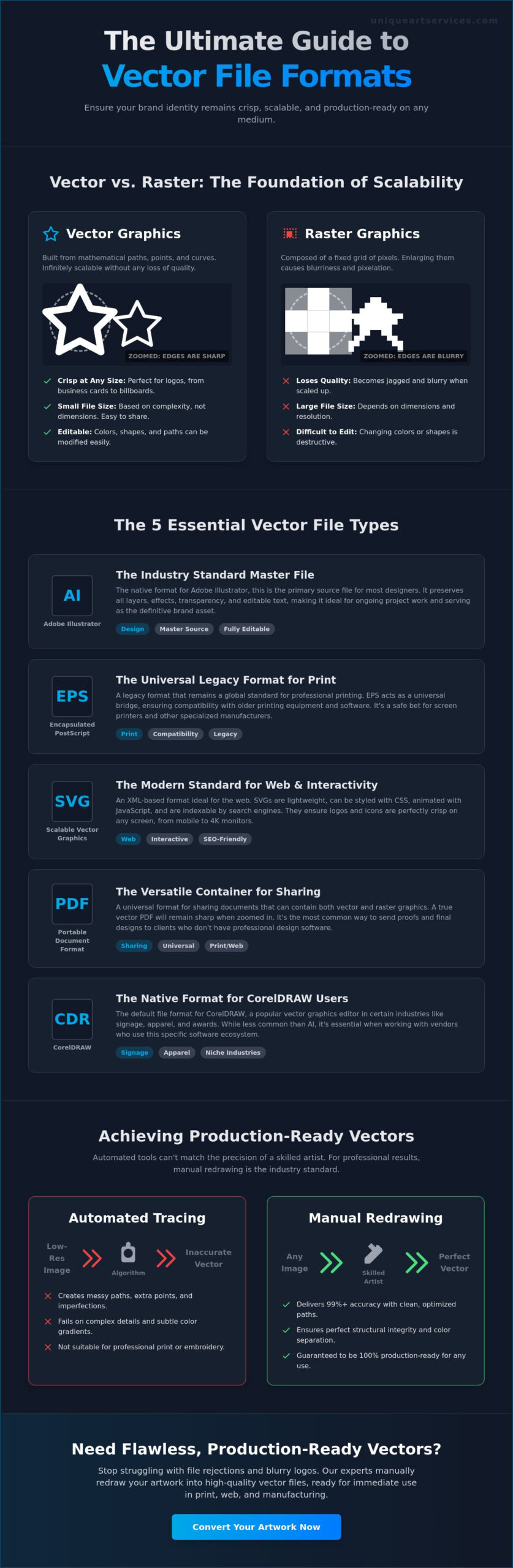
At its core, a vector file format is a set of mathematical instructions rather than a fixed grid of pixels. Most users are familiar with raster images like JPEGs or PNGs. These are composed of thousands of tiny colored squares. When you enlarge them, they blur and lose detail. Vector graphics function differently. They use points, lines, and curves based on mathematical equations to render an image. This approach ensures that no matter how much you zoom in or scale up, the edges remain razor sharp. The geometry is absolute.
Think of a raster image as a photograph of a house. If you try to blow it up to the size of a wall, the details become fuzzy and distorted. A vector is more like a set of architectural blueprints. You can use those same blueprints to build a dollhouse or a skyscraper. The proportions and clarity remain identical because the instructions don’t change based on the final size. Selecting the correct vector file format is the first step in creating a production-ready brand library that works for everything from business cards to stadium graphics.
Mathematical Precision vs. Pixel Grids
Vectors define shapes through X and Y coordinates. A circle isn’t a collection of red dots; it’s a specific command to draw a curve at a set radius from a central point. This mathematical foundation leads to a unique benefit regarding storage. The file size of a vector isn’t determined by its physical dimensions. A logo designed to fit on a letterhead has the same file size when it’s scaled to cover a billboard. Size is dictated only by the complexity of the paths and the number of points used to create the art. This efficiency makes them easy to share and store without sacrificing quality.
The Critical Role of Vectors in Brand Identity
Every professional brand guide begins with a master vector file. It’s the only way to ensure color consistency and structural integrity as a logo moves across different platforms. Because vectors are composed of distinct paths, designers can easily assign specific Pantone colors to individual elements. This precision is vital for specialized manufacturing processes. For instance, embroidery digitizing requires clean, defined lines to translate art into needle movements and thread paths. Without a proper vector foundation, production quality suffers. Brand colors shift and edges become ragged. Using vectors removes this friction, ensuring a stable and trustworthy visual identity for any commercial enterprise.
The 5 Essential Vector File Types for Production and Print
Choosing the right vector file format depends entirely on your final output. Some formats are proprietary, meaning they require specific software to open and edit. Others are open standards, designed for universal accessibility across web browsers and basic viewers. Understanding these essential vector file types ensures your artwork remains editable and production-ready throughout its lifecycle.
AI and EPS: The Industry Standards for Professional Design
AI is the native format for Adobe Illustrator. It serves as the master source file for most professional designers. This format preserves layers, transparency, and editable text, making it the best choice for ongoing design work. EPS, or Encapsulated PostScript, is a legacy format that remains a global standard. It acts as a universal bridge for older printing equipment. Many high-volume screen printing shops still require EPS files because they are compatible with older software versions that might struggle with modern AI files. If you need a professional vector art conversion for a specialized printer, EPS is frequently the safest delivery format.
SVG and PDF: Versatility for Web and Distribution
SVG has become the standard for modern web design. These files are XML-based, which means search engines can index the text within them. Unlike other formats, SVGs can be styled with CSS or animated. This makes them ideal for interactive site elements and responsive logos that must look perfect on both mobile screens and high-resolution monitors. PDF is the most common format for sharing files with non-designers. It’s a versatile container that can hold vector paths or flattened raster images. You can easily verify the contents using the “Zoom Test.” Open the PDF and zoom in to 600% or more. If the edges remain perfectly smooth, it contains true vector data. If they appear blocky, it’s simply a raster image saved as a PDF.
CorelDRAW (CDR) is the fifth essential format. While it is proprietary, it is the dominant choice for the signage and engraving industries. Many vinyl cutters and laser engravers are built to work directly with CDR pathing logic. While Illustrator is the global leader for general design, CorelDRAW remains a powerhouse in specialized manufacturing environments. Knowing which vector file format your vendor prefers can save hours of troubleshooting and prevent costly production delays.
Vector vs. Raster: Why Your Logo Needs Mathematical Paths
A common myth persists that you can transform a low-quality image into a professional vector file format simply by renaming the extension. Saving a blurry JPEG as a PDF or EPS does not change its internal structure. It merely places a pixel-based image inside a vector-capable container. This “fake vector” remains unscalable and will still fail when sent to a professional printer. True vectors require a manual redrawing process to establish the mathematical paths necessary for high-quality production.
Raster images are “baked.” Once a photograph or a scan is saved, the pixels are locked into a specific arrangement. You can’t easily reach into a JPEG to change the shape of a curve or the thickness of a line without leaving artifacts behind. Vectors are dynamic. Because they consist of distinct paths and anchor points, you can adjust any element of the design at any time. This flexibility is why a master logo must always exist in a vector state. It allows for instant color changes and structural tweaks that are impossible with flattened pixel grids.
The Pixelation Problem: Why JPEGs Fail at Scale
Imagine a grid of colored squares stretched to 1,000% of its original size. The once-smooth curves of your logo become a series of jagged blocks known as the “staircase effect.” This distortion is the hallmark of raster scaling. While you might try to compensate by increasing the DPI (Dots Per Inch), this only adds more pixels to an already flawed image. It doesn’t fix the underlying lack of geometry. A vector file format ignores DPI entirely. Since it relies on coordinates rather than dots, the output is always as smooth as the printing device’s maximum resolution allows. Whether it’s printed on a postage stamp or a skyscraper, the edge remains perfect.
Production Requirements: From Digital Screens to Physical Stitches
Physical manufacturing requires more than just a picture; it needs a digital map. Embroidery machines use vector paths to determine the exact direction, length, and density of every stitch. Without these “closed paths,” the digitizing software cannot calculate how the thread should fill a shape. Similarly, screen printing relies on clean vectors to create color separations. If an artist provides a raster file, the printer must spend hours manually isolating colors, which often results in extra setup fees. Clean vector art for promotional products eliminates this friction. It provides the precise data needed for vinyl cutters, laser engravers, and embroidery looms to execute a design without a single pixelated error. Understanding the full process of vectorizing art ensures you can confidently transform any low-resolution reference into a production-ready file that meets these demanding physical requirements.
How to Manage and Open Vector Files Without Professional Software
Receiving a professional design package often feels like being handed a locked vault. You have the files, but your computer might not recognize an .AI or .EPS extension. You don’t need an expensive monthly subscription to manage these assets effectively. Professional management starts with knowing how to interact with a vector file format using tools you already own or can access for free. This ensures your brand remains accessible to your entire team, not just the design department.
One critical step before archiving your files is ensuring all fonts are “outlined.” This process converts live, editable text into static mathematical shapes. If you skip this, a printer who doesn’t have your specific brand font will see a generic substitute. This simple oversight can compromise your brand’s visual identity instantly. Always request an outlined version of your vector file format for production and a live version for future internal edits. Keeping these two versions separate prevents most common printing errors.
Identifying True Vector Files (The Zoom Test)
You can verify the integrity of any file in seconds without specialized software. Open the file in a standard PDF viewer or a modern web browser. Zoom in to at least 800%. If the curves and slanted lines remain perfectly smooth, you have a true vector. If you see jagged “staircase” edges or a white box appearing behind the logo, you’re looking at a raster image saved inside a vector container. You can also right-click the file and check “Properties” or “Get Info.” Files created in Adobe Illustrator 30.4 or CorelDRAW 24.5 often retain metadata that confirms their professional origin.
Viewing and Using Vectors for Non-Designers
Modern web browsers like Chrome and Edge are excellent for viewing SVG and PDF files. Simply drag the file into a new browser tab to inspect the artwork. For basic editing or file conversion, Inkscape 1.4.3 is a powerful, free, open-source alternative to paid suites. It allows you to open most vector types and export them into different formats for daily use. Canva also supports SVG uploads, making it easy to use your professional logo in social media designs. However, if your file is corrupted or was never a true vector to begin with, DIY tools have limits. In those cases, ordering a professional vector art conversion is the most efficient way to secure production-ready results.
Organize your brand library by creating a “Master” folder that contains your vector files. Never use these masters for daily tasks like Word documents or emails. Instead, keep them as the pristine source for when you need to order promotional products, embroidery, or high-quality signage.
Achieving Production-Ready Vectors through Manual Conversion
A high-quality vector file format is only as effective as the paths that define its structure. Many business owners assume that clicking an “Auto-Trace” button in a design program is enough to modernize a legacy logo. In reality, automated tools often produce messy, unmanageable results that fail during physical production. True scalability requires a human touch to ensure every curve is mathematically perfect and every line is clean. Manual redrawing transforms a low-resolution reference into a pristine master asset that serves your brand for decades.
Think of manual conversion as a one-time investment in brand clarity. Once your artwork is correctly redrawn, you don’t have to worry about blurry edges or printer rejections again. This process is especially vital for specialized outputs. For instance, creating embroidery-ready files requires more than just smooth lines; it needs paths optimized for stitch density and direction. A professional redrawing service ensures that your vector file format is compatible with the rigorous demands of industrial manufacturing and high-volume branded merchandise production.
The Pitfalls of Automated Tracing Tools
Automated tracing tools work by guessing where lines should be. This often results in “node bloat,” where a simple curve is made up of hundreds of unnecessary points. Excessive nodes can cause vinyl cutters to stutter and embroidery software to crash. These tools also struggle with color overlapping. They often create “muddy” gradients and gaps between shapes that become visible when the art is enlarged. Manual redrawing eliminates these errors. A professional artist uses geometric precision to ensure perfect symmetry, closed paths, and logical color separations that automated software simply cannot replicate.
Unique Art Services LLP: Precision Redrawing in 12 Hours
At Unique Art Services LLP, we remove the friction from your creative workflow. We bring over 15 years of industry expertise in high-volume vector art conversion to every project we touch. We understand that in the commercial world, speed is just as important as accuracy. That’s why we maintain a 12-hour standard turnaround time for our redrawing services. If you’re facing a tight production deadline, our 4-hour rush order processing ensures your project stays on track without sacrificing quality.
Our commitment to craftsmanship is reflected in our “First-Time-Right” approach. We maintain a 99% first-time-right accuracy rate, ensuring that the files you receive are ready for immediate use in embroidery digitizing, screen printing, or large-format signage. We don’t just provide a file; we provide the technical backbone for your brand’s physical presence. Get your production-ready vector conversion today and experience the difference that professional manual pathing makes for your business.
Future-Proof Your Visual Assets for Any Medium
Mastering the correct vector file format is the difference between a crisp, professional brand and a pixelated production disaster. By understanding the specific roles of AI, SVG, and PDF files, you ensure your design team and your vendors operate with total clarity. As we’ve explored, technical success relies on more than just the right extension; it requires mathematical precision that automated tools simply cannot provide. True scalability is achieved through manual pathing that respects the geometry of your design.
We are ready to help you eliminate production friction. With over 15 years of industry expertise and a 99% first-time-right accuracy rate, we provide the stable backbone your creative projects need. Transform your blurry logo into a precision vector file in under 12 hours, or utilize our 4-hour rush service for your most urgent deadlines. Our team handles the technical heavy lifting so you can focus on growing your business with confidence. Take control of your brand library today and ensure your logos are ready for every medium, from digital screens to physical threads.
Frequently Asked Questions
What is the difference between a vector and a raster file?
Vector files use mathematical paths to define shapes, while raster files are composed of a fixed grid of colored pixels. This allows vectors to scale to any size without losing clarity. Rasters, such as JPEGs and PNGs, become blurry and pixelated when enlarged beyond their original dimensions. This fundamental distinction is why high-volume printing and manufacturing require a professional vector file format.
Can I turn a JPEG into a vector file just by renaming the extension?
No, changing the file extension does not alter the internal data structure of the image. A JPEG is built from pixels. Simply renaming it to .AI or .EPS leaves those pixels intact within a new container. To create a functional vector, the artwork must be manually redrawn or traced to establish the mathematical coordinates that define a true vector graphic.
Which vector file format is best for a company logo?
Adobe Illustrator (AI) is the industry standard for master logo files because it preserves full editability and layers. For daily sharing and production, PDF is the most versatile choice. If you are preparing a logo for web use, SVG is the superior format due to its small file size and perfect rendering on high-resolution screens.
Why does my printer say my PDF isn’t a ‘real’ vector file?
PDFs are versatile containers that can hold both vector paths and flattened raster images. If a low-resolution JPEG was saved as a PDF, the file still contains pixels rather than mathematical paths. Printers require the underlying geometry of a vector to calculate cut lines or color separations. If you zoom in and see jagged edges, the PDF is not a true vector.
Do I need special software like Adobe Illustrator to open a vector file?
You don’t need expensive professional software just to view or manage a vector file format. Modern web browsers like Chrome and Edge open SVG and PDF files instantly. For basic handling or small edits, free open-source tools like Inkscape 1.4.3 provide a robust alternative to paid subscriptions. Many online design platforms also now support direct vector uploads for branding tasks.
What is an SVG file and when should I use it?
SVG stands for Scalable Vector Graphics and is the primary standard for web-based imagery. You should use it for website logos, icons, and interactive elements. Because SVGs are XML-based, they are readable by search engines and can be styled with CSS. This makes them ideal for responsive web design where graphics must remain crisp on every device.
How much does it cost to have a logo converted to vector format?
Conversion costs typically depend on the complexity of the artwork and the required turnaround speed. A simple typographic logo requires less labor than a detailed crest with multiple gradients. Most professional services provide a custom quote based on the specific detail level of your project. This ensures you only pay for the precision required for your unique brand assets.
Why is manual vector conversion better than automated tracing software?
Manual redrawing ensures 99% accuracy by creating clean, logical paths with a minimal number of anchor points. Automated tracing software often creates “node bloat,” resulting in jagged edges and files that crash production machinery. Manual conversion is a one-time investment that guarantees your artwork is optimized for technical processes like embroidery digitizing and large-format printing.