Mastering Vector Graphics: A Comprehensive Reference for Modern Brands (2026)

You’ve just sent your high-resolution logo to the signage shop for a ten-foot banner, only to receive a proof that looks like a pixelated staircase. It’s a frustrating, time-consuming setback that usually stems from a fundamental misunderstanding of vector vs raster files. Most brand owners assume a clear image on a laptop screen will look just as sharp on a stadium billboard or a custom-embroidered polo. When an embroidery or screen printing shop rejects your artwork, they aren’t being difficult; they are identifying a technical limitation that prevents a professional outcome.
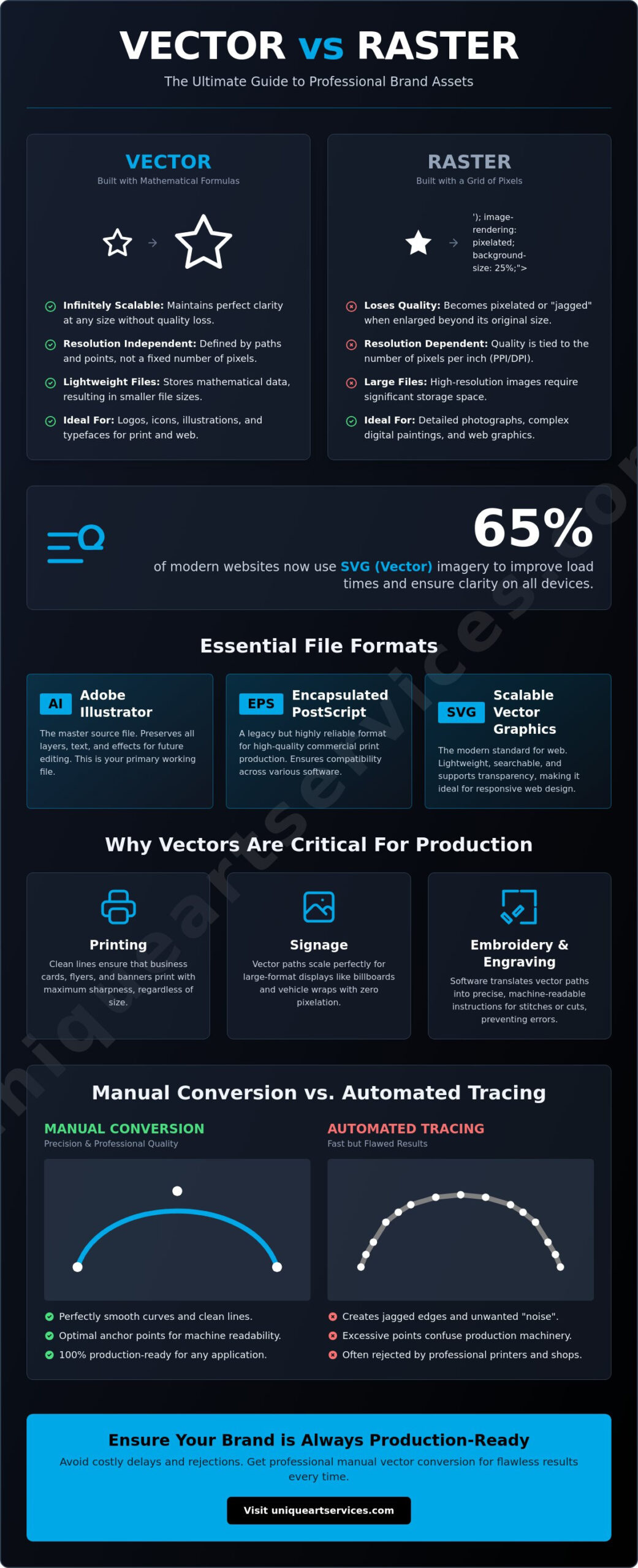
This guide will demystify the technical foundations of vector graphics, showing you why mathematical precision is the essential backbone of professional brand production. You’ll discover how over 65% of modern websites now leverage SVG imagery to maintain speed and clarity across devices. We will also break down the specific file formats you need for different vendors, the current 2026 software landscape, and exactly when you need a professional hand to manually convert your assets for production-ready results.
Key Takeaways
- Learn how mathematical precision ensures your brand assets remain sharp at any scale, from digital icons to large-format displays.
- Master the vector vs raster distinction to select the correct format for high-quality printing and physical manufacturing.
- Identify the specific file types required by vendors to prevent artwork rejection and ensure seamless production workflows.
- Discover how clean vector paths translate into machine-readable instructions that reduce errors in embroidery and manufacturing.
- Understand why manual vector conversion is essential to eliminate the technical noise and jagged edges caused by automated tracing tools.
What Are Vector Graphics? Defining Mathematical Precision
To understand why your artwork occasionally fails in production, you must first grasp the technical architecture of Vector graphics. Unlike traditional photographs, which are composed of a fixed grid of colored squares, vectors are built using mathematical formulas. This distinction is the foundation of the vector vs raster debate. While a raster image is a static map of pixels, a vector file is a dynamic set of geometric instructions. In the 2026 digital landscape, where 8K displays and mobile-first design are the standard, this mathematical approach is no longer optional for professional brands.
The point-to-point pathing system used in vectors allows for a level of clarity that raster systems cannot match. A raster image relies on a “grid-of-colors.” If you zoom in too far, the grid becomes visible, resulting in the dreaded “pixelated” look. Vectors bypass this limitation entirely. By using coordinates and equations to define lines and shapes, the software recalculates the image every time it is resized. This ensures that brand integrity remains intact, whether the logo is viewed on a smartphone or a massive digital display in a global city center.
The Core Difference: Paths vs. Pixels
Every shape in a vector file is defined by anchor points and Bézier curves. These mathematical paths tell the computer exactly where a line starts, where it ends, and how it curves. Because these instructions are calculated in real-time, you can resize the image infinitely without losing a single detail. You won’t see jagged edges or blurry gradients because the software isn’t stretching pixels; it’s recalculating the geometry. Vector graphics are essentially a set of geometric instructions that tell software how to draw shapes on the fly.
Why Scalability is the Vector’s Superpower
This mathematical approach provides “resolution independence,” a critical factor for modern brand production. A logo designed as a vector can scale from a 1-inch business card to a 50-foot billboard with zero pixelation. In contrast, a high-resolution raster file required for that same billboard would be massive, often several gigabytes in size. Vector files remain incredibly small because they only store the coordinates of the paths, not the data for every individual pixel. This efficiency is vital for performance. Recent data shows that 65% of websites now use SVG imagery to improve load times and meet Core Web Vitals requirements. Choosing the right format in the vector vs raster workflow isn’t just about aesthetics; it’s about storage efficiency and speed across all platforms.
Essential Vector Graphics File Types and Formats
Sending the wrong file to a vendor often results in production delays or rejected artwork. To avoid these friction points, you must understand the hierarchy of formats used in professional design. The choice between vector vs raster is only the first step. Once you’ve committed to a vector workflow, selecting the specific file extension determines whether your printer, web developer, or embroidery partner can actually use the asset. Professional vendors require specific data structures to drive their machinery or code, and providing the wrong format can lead to expensive errors.
A common point of confusion is the distinction between native software files and universal exchange formats. Native files are designed for the software they were created in, preserving every editable detail. Exchange formats are meant for sharing across different platforms. If you’re unsure if your current assets are production-ready, securing professional vector art services ensures you always have the correct files on hand for any project.
Universal Standards: AI, EPS, and SVG
- AI (Adobe Illustrator): This is your master source file. It preserves all layers, editable text, and complex effects. Most modern vector applications rely on AI as the primary development environment for high-precision branding.
- EPS (Encapsulated PostScript): While some consider it a legacy format, EPS remains a standard for high-quality commercial print production. It’s a reliable exchange format that works across various design and manufacturing software.
- SVG (Scalable Vector Graphics): SVG 1.1 is currently the most reliable standard for web use. It’s lightweight, searchable, and supports transparency. This makes it the perfect choice for responsive UI design and mobile apps.
Production-Specific Formats for Print and Embroidery
Many business owners believe that saving a low-resolution JPEG as a PDF transforms it into a vector. This is a technical error. A PDF is simply a container. If you put a raster image inside it, it remains a raster. Professional printers prefer PDFs because they can contain vector paths that stay sharp at any size, but those paths must exist before the file is saved. Always check your vector vs raster settings before exporting to ensure you aren’t just wrapping a pixelated image in a PDF shell.
In the manufacturing world, vector paths serve as the essential foundation for embroidery file types. An embroidery machine cannot read an AI or SVG file directly. Instead, a specialist must translate those mathematical paths into stitch-based instructions like DST or PES. This technical transition relies entirely on the precision of the original vector curves. If the paths are messy or overlapping, the resulting embroidery will suffer from thread breaks and machine errors. Using clean, professionally built vectors reduces production time and ensures the final physical product matches your digital vision.
Vector vs. Raster: Choosing the Right Format
Selecting the appropriate image format is a strategic decision that affects every stage of your brand’s production. It isn’t a matter of one being superior to the other. Instead, the choice between vector vs raster depends entirely on the technical requirements of your specific project. A professional design workflow recognizes that these two systems serve different masters: one excels at capturing the organic complexity of the real world, while the other provides the rigid precision required for manufacturing and scaling. Misapplying these formats leads to blurred visuals, rejected print jobs, or bloated file sizes that slow down digital platforms.
Modern branding often employs a hybrid approach. You might place a crisp vector logo over a high-resolution raster photograph for a social media campaign. This allows you to leverage the strengths of both systems simultaneously. However, legacy assets often pose a challenge. If your primary brand mark exists only as a grainy pixelated file, you will likely require a low resolution image to vector conversion to make it viable for 2026 production standards. Without this transformation, your brand remains locked in a format that cannot grow with your business.
When to Use Raster (Photography and Complex Shading)
Raster images are the correct choice when your project involves photography, intricate textures, or hyper-realistic shading. Because these files map out every individual pixel, they can reproduce the subtle color shifts and shadows that make a photograph feel authentic. Converting a high-resolution photograph into a vector file often results in a flattened, cartoonish appearance. Mathematical paths struggle to replicate the millions of unique color values found in a single digital photo. When your priority is photorealism, stick to these common raster extensions:
- JPG: Ideal for web photographs where small file size is a priority.
- PNG: The standard for digital graphics that require transparent backgrounds.
- TIFF: A high-quality, uncompressed format preferred by professional photographers and fine-art printers.
- WEBP: A modern, highly efficient format designed for fast-loading 2026 web environments.
When Vector is Non-Negotiable (Logos and Manufacturing)
Vector graphics are mandatory for any asset that represents your core brand identity. Logos, icons, and custom typography must be built as vectors to ensure they remain sharp on everything from a favicon to a skyscraper wrap. Beyond visual clarity, vectors are a functional requirement for physical production. Screen printers, for example, rely on vector paths to create accurate color separations for their screens. Using a rasterized logo for corporate branding is a significant professional risk. It suggests a lack of technical oversight and often results in “halo” effects or jagged edges that diminish brand authority. For manufacturing, signage, and long-term brand stability, the mathematical precision of a vector is the only acceptable standard.
The Role of Vector Graphics in Physical Production
Physical manufacturing equipment does not see images the way a human eye or a standard computer monitor does. While a screen displays a grid of light, an embroidery machine, laser cutter, or vinyl plotter requires a set of precise coordinates to move a tool through space. In the context of physical manufacturing, the vector vs raster debate is settled by the machinery itself. Most automated production tools are fundamentally path-based. They need to know exactly where to start, which direction to travel, and where to stop. A raster image, composed of thousands of independent pixels, cannot provide these instructions without a complex and often imperfect translation process.
Clean vector paths are the primary driver of production efficiency. When a file contains “noisy” or overlapping paths, the machine may stutter, leading to jagged cuts or thread breaks. By providing high-quality vectors, you reduce machine run-time and minimize the risk of hardware errors. This technical precision directly influences the final physical appearance of your brand. If you need production-ready assets that won’t fail at the factory, our team provides expert Vector Art services to streamline your workflow and ensure your designs are manufacturing-ready from day one.
Vector Graphics for Professional Embroidery Digitizing
Professional logo digitizing relies heavily on the quality of the initial vector input. A digitizer uses these mathematical paths to determine stitch direction, density, and sequencing. If the source file is a blurry raster, the digitizer must guess where an edge begins or ends. This ambiguity often results in “pull and push” errors where the fabric puckers or the design shifts during the embroidery process. For a detailed breakdown of this technical workflow, consult our guide on how to convert a logo to an embroidery file. If you want to go further and ensure your artwork is purpose-built for fabric from the ground up, our comprehensive resource on custom logo design for embroidery explains how to engineer your brand specifically for the physics of thread and needle.
Precision for Screen Printing and Large Format Signage
Vectors are equally critical for screen printing and large-scale signage. In screen printing, each color requires a separate physical screen. Vector graphics allow designers to assign specific spot colors, such as Pantone shades, to individual paths with absolute certainty. This ensures color consistency across different production runs. For large-format signage, the vector vs raster choice is a matter of basic physics. A billboard-sized print requires an image that can scale to hundreds of inches without losing its edge. Because vectors use mathematical formulas rather than pixels, they maintain a razor-sharp finish regardless of the final output size. This same precision allows vinyl cutters and laser engravers to follow a single, continuous line for a clean, professional result every time.
Manual Vector Conversion vs. Automated Tracing Tools
While previous sections established the technical superiority of mathematical paths, the method used to create those paths is just as critical to your success. Many designers attempt to bridge the vector vs raster gap using automated tracing software. While “one-click” tools appear efficient, they frequently produce files that are unusable for professional manufacturing. These programs lack the human eye’s ability to distinguish between a deliberate design element and a digital artifact. True production readiness requires a “First-Time-Right” approach that automation simply cannot guarantee. Relying on software to interpret your brand assets often leads to expensive delays and rejected artwork at the production stage.
Professional design fulfillment centers on the principle of absolute precision. When you send a file to a vendor, it should be technically flawless to prevent the friction of back-and-forth communication. Manual redrawing remains the only way to achieve 99% production accuracy. It transforms a static, pixel-based image into a dynamic set of instructions that any machine can follow with ease, ensuring your project stays on schedule and within budget.
The Technical Limitations of One-Click Auto-Trace
The most significant issue with automated tracing is the “node explosion” problem. Software creates thousands of redundant anchor points to try and match the jagged edges of a raster image. A simple curve that should require only two or three points might end up with fifty. This technical noise causes manufacturing equipment, like vinyl cutters or embroidery machines, to stutter as they try to process every unnecessary coordinate. Automated tools also fail to correctly interpret typography and fine geometric details. They often turn sharp corners into rounded blobs and distort the specific weight of your brand’s fonts. The time your team spends cleaning up these messy, automated files often outweighs the initial speed of the software.
Why Professional Manual Redrawing Ensures Production Readiness
Manual redrawing involves a skilled designer plotting every anchor point and Bézier curve by hand. This process ensures that every path is logical, streamlined, and optimized for its intended output. For instance, manual conversion simplifies complex designs for embroidery digitizing by creating clean boundaries that a digitizer can easily translate into stitch paths. A human designer understands the intent of the logo, maintaining the exact proportions and sharp edges that define your brand identity.
Unique Art Services LLP provides this level of high-precision craftsmanship with a standard 12-hour turnaround for manual vector art. We don’t rely on shortcuts because we understand that your brand’s physical reputation depends on the quality of the underlying file. By choosing manual conversion over automated tracing, you secure a stable, production-ready asset that works perfectly the first time, every time.
Future-Proof Your Brand Identity
The technical architecture of your brand assets determines how successfully they translate from a screen to the physical world. By prioritizing mathematical precision over pixel-based grids, you ensure your designs remain sharp and professional regardless of the application. Understanding the nuances of vector vs raster imagery is the first step toward total brand consistency. You now have the framework to select the correct file formats and recognize when manual intervention is necessary to avoid production errors.
Unique Art Services LLP supports your growth with over 15 years of professional design experience. Our global service hubs provide 24/7 support to ensure your projects never stall, regardless of your time zone. We maintain a 99% plus first-time-right rate for production designs, giving you the confidence that your files will be accepted by any vendor. High-quality branding shouldn’t be a bottleneck in your workflow. It’s time to secure the precision your business requires.
Get Production-Ready Vector Art in as Little as 4 Hours. Your brand is ready for the next level, and we are here to provide the stable technical backbone you need for success.
Frequently Asked Questions
What is the most common vector graphics file format?
AI is the industry standard for design, while SVG is the most common format for web applications. SVG 1.1 is currently the most compatible version for modern browsers and mobile devices. For commercial printing and cross-platform sharing, EPS remains a dominant exchange format because it preserves complex path data across different software environments.
Can I convert a JPEG into a vector graphic?
You can convert a JPEG to a vector, but you can’t simply change the file extension. The vector vs raster conversion process requires redrawing the pixel-based image using mathematical paths. While automated tools exist, they often create messy results. Manual redrawing by a professional designer is the only way to ensure 99% accuracy for manufacturing and high-resolution printing.
Why does my printer keep asking for a vector file?
Printers require vector files because they provide infinite scalability and precise path data for their equipment. Unlike raster images that pixelate when enlarged, vectors maintain sharp edges at any size. This is essential for large-format signage and for machines that must follow a physical path, such as vinyl cutters, laser engravers, or embroidery machines.
Is a PDF always a vector file?
A PDF is not inherently a vector file; it is a container that can hold both vector and raster data. If you save a low-resolution JPEG as a PDF, it remains a pixel-based image. To be a true vector PDF, the original artwork must be created with paths in software like Adobe Illustrator before being exported into the PDF container.
What is the difference between SVG and EPS?
SVG is designed for digital environments, while EPS is optimized for professional print production. SVGs are lightweight and searchable, making them perfect for modern web design and UI icons. In the vector vs raster workflow, EPS serves as a robust container for commercial printing because it supports the complex color profiles and post-script instructions required by production hardware.
Can vector graphics be used for photos?
Vector graphics are generally not suitable for digital photography. They struggle to replicate the millions of unique colors and soft gradients found in a real-world photo. Attempting to vectorize a photograph usually results in a simplified, posterized, or cartoonish look. For photorealistic images, raster formats like JPG or TIFF remain the correct technical choice.
Why is manual vector conversion better than auto-tracing?
Manual conversion is superior because it eliminates the technical noise and “node explosion” generated by software. Automated tools create thousands of redundant points that cause manufacturing equipment to stutter or fail. A human designer plots every anchor point strategically. This creates a clean, streamlined file that is ready for embroidery digitizing or screen printing without further adjustments.
Do I need special software to open vector graphics?
Professional design software is typically required to open and edit vector files. Adobe Illustrator, CorelDRAW, and the now-free Affinity Designer are the industry standards. While web browsers can render SVGs and most computers can view vector PDFs, you’ll need specialized tools to modify the underlying mathematical paths. Professional vector art services can provide these files in formats ready for immediate use.