
Understanding Image in Vector Format: The Professional Guide to Scalable Graphics in 2026
Last week, a creative director discovered that their high-resolution logo was actually a liability when scaled for a ten-foot trade show banner. The result was a pixelated mess that no amount of digital sharpening could fix. This happens because a standard image in vector format operates on mathematical paths rather than fixed pixels. It’s frustrating to deal with “free” converters that produce jagged lines or embroidery machines that reject low-quality files. You need assets that remain crisp at any size, ensuring your brand looks professional every time it’s reproduced.
We agree that technical file errors shouldn’t stall your production deadlines. In this guide, you’ll master the critical differences between raster and vector formats and learn why professional manual conversion is the secret to truly production-ready artwork. We’ll preview the 2026 landscape of tools like Adobe Illustrator 30.5 and Affinity 3.2.2, providing a clear roadmap to help you secure 100% scalable files for screen printing, embroidery, and beyond. This methodical approach ensures your brand assets are always ready for the most demanding manufacturing standards.
Key Takeaways
- Understand why mathematical coordinates allow an image in vector format to maintain crisp edges at any scale.
- Identify the technical components like anchor points and Bezier curves that define high-quality vector geometry.
- Compare the precision of manual redrawing against automated tracing to avoid common production errors in text and gradients.
- Follow a structured methodology for preparing source images to facilitate a fast and accurate conversion process.
- Learn how professional vector art services ensure your files are 100% ready for embroidery and high-volume production.
What is an Image in Vector Format? Concepts and Definitions
Most users view digital graphics as a collection of colored squares. While this works for social media, it’s a significant hurdle for physical production. An image in vector format operates on a completely different logic. Instead of relying on a grid of pixels, it uses mathematical instructions to define shapes, lines, and colors. This shift from static dots to dynamic geometry is what allows a logo to look just as sharp on a postage stamp as it does on a massive highway billboard.
The core advantage of this technology is its independence from resolution. When you scale a vector file, the software recalculates the coordinates of every point and curve in real time. There’s no “stretching” involved; the image is essentially redrawn at the new size. This precision makes vector files the industry standard for commercial manufacturing, where machines require exact paths to follow for cutting, stitching, or engraving.
Raster Graphics: The Limitation of Pixels
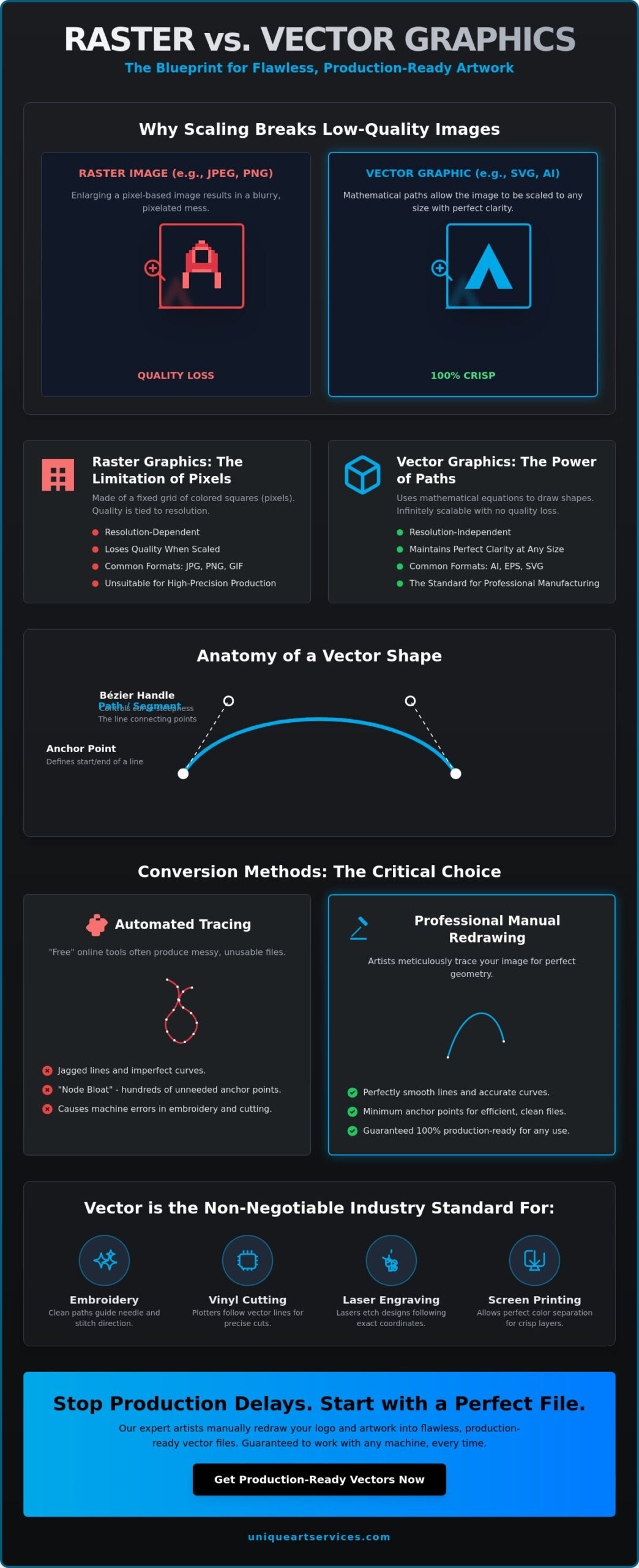
Formats like JPEG, PNG, and GIF are raster-based. They’re built from a fixed number of pixels. If you try to enlarge these files, the software must “guess” how to fill the gaps between the original squares. This process leads to pixelation, where edges appear jagged and colors look muddy. For high-precision production, raster images are often unusable. They lack the structural data needed for a machine to understand where a shape begins and ends.
Vector Graphics: The Power of Mathematical Paths
In contrast, Vector graphics store data as a series of points connected by lines, known as paths. These paths can be straight or curved, and they’re defined by geometric equations. Professionals use formats like SVG, AI, and EPS to ensure their work remains infinitely scalable. Because these files store math rather than millions of individual pixel colors, they are often much smaller in size than high-resolution raster files. Every professional brand identity must include an image in vector format to remain versatile across different media.
In 2026, the demand for these assets is higher than ever. Several key industries depend exclusively on vector-only files to operate:
- Embroidery Digitizing: Machines need clean paths to determine needle placement and stitch direction.
- Signage and Vinyl Cutting: Plotters follow vector lines to slice through material with surgical precision.
- Laser Engraving: The laser follows the mathematical coordinates of the vector to etch designs into wood, metal, or glass.
- Screen Printing: Vector files allow for perfect color separation, ensuring each ink layer is crisp and aligned.
Choosing the right format isn’t just a technical preference. It’s a requirement for professional-grade output. Without a clean vector foundation, your production quality will always be limited by the resolution of your original file.
The Technical Mechanics: How Vectorization Works
To understand how an image in vector format functions, you have to look at it as a digital blueprint. Unlike a photo that captures light on a grid, a vector file maps out shapes on a Cartesian coordinate system. Every element exists on a specific X and Y axis. This mathematical foundation allows the artwork to be reconstructed perfectly regardless of the zoom level or print dimensions. It’s a system built for precision, not just display.
The anatomy of a vector consists of three core components: anchor points, segments, and Bezier curves. Anchor points act as the structural nodes that define the start and end of a line. Segments are the paths connecting those nodes. For industries like vinyl cutting or embroidery, creating closed paths is non-negotiable. If a path remains open, the manufacturing equipment won’t recognize the shape as a solid object. This leads to production errors, skipped stitches, and wasted materials.
Bezier Curves and Anchor Point Precision
Bezier curves use mathematical formulas to create smooth, flowing lines between anchor points. Understanding what vector art is requires recognizing the importance of handle placement. These handles determine the direction and steepness of a curve. In professional manual redrawing, designers use the minimum number of anchor points necessary to achieve a shape. Automated tools often create hundreds of unnecessary points. This node bloat makes files sluggish and causes embroidery machines to stutter during production.
Layering and Grouping for Complex Artwork
Professional vector files are organized into logical layers. This structure allows for rapid color swaps and easy editing for different brand applications. We often use compound paths to create transparency within a design, such as the hole in the center of a letter. This level of organization ensures your brand assets remain versatile. If you’re struggling with messy, unorganized files, opting for a professional Vector Art service can transform your workflow and ensure your assets are production-ready from day one.
Color separation is another technical triumph of the vector format. Because each shape is a distinct mathematical object, printers can easily isolate specific colors for screen printing. This eliminates the halos or blurry edges often seen when trying to separate colors in a raster file. It’s a clean, efficient system that prioritizes precision. When you convert an image in vector, you’re essentially building a master file that serves every possible manufacturing need.
Manual Redrawing vs. Automated Tracing: Choosing Your Approach
The allure of a one-click solution is powerful. Many businesses turn to free online converters hoping for an instant image in vector result. However, speed often comes at the expense of structural integrity. While automated tracing software has improved by 2026, it still lacks the critical ability to interpret human intent. An algorithm sees a cluster of gray pixels and creates a jagged, multi-layered shape. A professional designer sees a shadow and knows it should be a clean, single-point curve. This human interpretation is the difference between a file that prints perfectly and one that requires hours of cleanup. For a deeper understanding of how to achieve scalable, production-ready results, the comprehensive guide to professional vector artwork covers the latest 2026 industry standards and workflows in detail.
The hidden cost of “free” tools is the time spent fixing their mistakes. Production managers frequently receive automated files that look fine on a screen but fail immediately on the factory floor. These files often contain thousands of overlapping paths and redundant nodes. This “dirty” geometry causes embroidery needles to break and vinyl cutters to tear the material. When you need an image in vector format for commercial use, manual pathing is the only way to guarantee stability. Investing in a professional redraw the first time is significantly more cost-effective than halting a production line to troubleshoot a broken file.
When Auto-Tracing Fails: Low Resolution and Complexity
When dealing with a low resolution image to vector conversion, software typically “hallucinates” details. It interprets compression artifacts as part of the design, resulting in wavy lines where there should be straight edges. In the context of Vector graphics, this lack of mathematical logic is catastrophic for manufacturing. AI particularly struggles with overlapping shapes, often creating gaps that lead to “thread show-through” in embroidery or registration errors in screen printing. These technical glitches are often invisible until the physical product is already in production.
The Precision of Manual Pathing for Manufacturing
In contrast, converting pictures to vector format manually allows for total control over line weights and path closure. This is essential for needle-and-thread production where every millimeter matters. For instance, anime digitizing requires extreme attention to character detail and facial expressions. An automated tool would blur these fine lines into a generic blob. A human specialist preserves the artist’s original vision while ensuring the file is technically sound for high-speed machinery. This manual precision is the backbone of any production-ready asset.
Preparing Your Files for Professional Vector Conversion
Preparing for a professional conversion requires more than just sending a file. It’s a strategic process that ensures your final assets are ready for the factory floor. High-quality input directly impacts the speed and accuracy of the reconstruction. If you submit a low-resolution thumbnail, the designer must interpret missing details; this increases the risk of inaccuracy. Following a structured preparation checklist saves time and prevents costly revisions during the production phase. A clean source file allows the specialist to map out every anchor point with absolute fidelity.
First, select the highest quality source image available. A high-resolution PNG or a clean scan is always preferable to a social media screenshot. Second, identify your intended use. A file destined for a website requires different pathing than one meant for physical manufacturing. Third, communicate your color requirements clearly. Using Pantone codes instead of generic “red” or “blue” ensures your brand remains consistent across different materials. Finally, choose the correct output format to match your manufacturing needs. This methodical approach ensures your image in vector is built correctly from the start.
Essential Vector File Formats for Modern Brands
Professional printers almost exclusively require AI or EPS files. These formats preserve the full editing capabilities of the artwork, including layers and color profiles. For digital applications, SVG is the superior choice in 2026. It allows for infinite scalability on websites without the weight of large raster files. While SVG 2.0 is the current standard, we recommend using core features of SVG 1.1 for maximum browser compatibility, especially with Safari. PDF remains the universal standard for proofing, allowing you to review the image in vector accurately on any device before finalizing the project.
Avoiding Common Vector Tracing Errors
Even with high-end tools, technical mistakes can ruin a file. You must check for common vector tracing errors like overlapping paths or stray anchor points. These hidden artifacts are often invisible on a screen but cause physical machines to malfunction during embroidery or vinyl cutting. Another critical step is font outlining. If you don’t convert your text to paths, the file may display incorrectly if the printer doesn’t have your specific typeface. Ensuring your paths are closed and your layers are organized is the mark of a production-ready file. If you need assistance with complex assets, our Vector Art specialists can handle the technical heavy lifting for you.
Why Unique Art Services is Your Partner for Production-Ready Vectors
Choosing a technical partner requires more than just finding a service provider. It involves selecting a stable backbone for your creative and commercial operations. Unique Art Services operates with the precision of a high-tech firm, bringing over 15 years of specialized experience to every project. We don’t just provide a file; we deliver production-ready infrastructure. Our team understands that a delay in artwork means a delay in the factory. This is why we’ve optimized our workflow to support high-capacity industries with speed and absolute reliability.
When you trust us with your image in vector project, you gain access to a global specialist. We maintain a “First-Time-Right” commitment, boasting a 99%+ accuracy rate across thousands of complex conversions. This dedication to precision removes the friction from your creative process. Our communication is brisk and purposeful, mirroring the fast-paced nature of the industries we serve. We currently support a diverse client base across the US, UK, Canada, and Australia, ensuring that professional standards are met regardless of your geographic location.
Efficiency is a core pillar of our service model. We offer a standard 12-hour turnaround for most projects to keep your production moving. For critical deadlines, our 4-hour rush order processing provides an immediate solution to urgent manufacturing needs. This rapid execution doesn’t compromise quality. Every file undergoes rigorous internal checks to ensure it meets the technical requirements of your specific equipment. We act as a proactive problem-solver, catching potential errors before they reach your machines.
Manual Redrawing by Expert Designers
Software cannot replicate the intuition of a seasoned designer. Every image in vector format we produce is redrawn by hand. We don’t use automated shortcuts that result in node bloat or jagged paths. Instead, our designers use manual pathing tailored specifically for your manufacturing equipment, whether it’s a vinyl cutter or a high-speed embroidery machine. This human element allows us to perform quality control checks that automated software simply cannot execute. We interpret the blurry edges of your source files and transform them into crisp, mathematical perfection.
Seamless Workflow from Artwork to Production
Our expertise extends across the entire decorative arts spectrum. Our vector art services integrate directly with our specialized embroidery digitizing and logo design offerings. This unified approach creates a seamless transition from your initial concept to the final physical product. We are equipped to handle high-volume fulfillment needs for large-scale commercial enterprises while maintaining an attentive focus on fine details. Accuracy is our pride. Reliability is our promise. Contact Unique Art Services LLP today to start your project and secure assets that are 100% ready for production.
Secure Your Brand’s Scalable Future
A professional brand identity requires more than just a visually appealing logo. It demands technical precision that can withstand the rigors of modern manufacturing. By choosing manual redrawing over automated tracing, you ensure that every path and anchor point is optimized for your specific production needs. Proper file preparation and a clear understanding of output formats like AI and SVG will protect your assets from pixelation and manufacturing errors. Transforming your primary brand assets into a crisp image in vector format is the most effective way to guarantee consistency across all physical and digital media.
Unique Art Services provides the stable backbone your business needs to scale with confidence. With 15+ years of industry expertise and a 99%+ first-time-right rate, we remove the technical friction from your creative process. Whether you need standard 12-hour execution or urgent 4-hour rush processing, our team delivers production-ready files that work perfectly every time. Get Your Production-Ready Vector in 12 Hours and experience the difference that manual precision makes for your brand. We look forward to helping you achieve flawless results on your next project.
Frequently Asked Questions
What is the difference between a raster and a vector image?
Raster images are composed of a fixed grid of pixels, while vector images are built from mathematical paths. This means raster files like JPEGs lose quality and become blurry when enlarged. Vectors remain perfectly sharp at any scale. It’s the practical difference between a static photograph and a dynamic geometric blueprint designed for infinite scalability.
Can any image be converted into a vector format?
Almost any graphic can be converted, though the final style depends on the complexity of the source material. Logos and line art convert into clean, sharp shapes with absolute precision. Complex photographs are transformed into stylized vector art with distinct color blocks. While the conversion is always possible, manual redrawing is necessary to ensure the resulting file is technically sound for manufacturing.
Why do I need a vector file for my company logo?
A vector file is essential because it serves as the master asset for every possible brand application. Whether you’re printing a small business card or a massive billboard, the logo will never pixelate. Most professional manufacturing processes, including embroidery and vinyl cutting, require the mathematical paths found in an image in vector format to guide their machinery accurately.
How long does it take to convert an image in vector manually?
Professional manual conversion typically takes 12 hours for a standard turnaround. If you’re facing a tight production deadline, rush options can deliver a completed image in vector in as little as 4 hours. This timeline ensures that a human designer has enough time to redraw every path by hand, guaranteeing 100% accuracy for your embroidery or print equipment.
What is the best file format for a vector image?
The optimal format depends entirely on your intended use case. AI and EPS are the industry standards for professional printing and high-end design work. SVG is the superior choice for web scalability and digital animations. For universal viewing and document sharing without specialized software, a high-quality PDF is often the most practical solution for proofing and approval.
Why should I avoid using free online auto-tracing tools for my brand?
Free auto-tracing tools often produce “dirty” files with jagged edges and thousands of unnecessary anchor points. This node bloat makes files difficult to edit and causes production machines to malfunction or stutter. Automated tools can’t interpret text or overlapping shapes correctly. Choosing professional vector artwork created through manual redrawing prevents these technical errors and saves you from costly production delays.
Can I convert a low-resolution photo into a high-quality vector?
Yes, manual redrawing can transform a blurry, low-resolution file into a crisp, high-quality vector. A skilled designer doesn’t just trace the pixels; they interpret the original design and reconstruct the geometry from scratch. This process restores the sharp edges and fine details that were lost in the original raster file, making it suitable for large-scale printing and embroidery.
Do I need special software to open a vector file?
You need specialized software like Adobe Illustrator or CorelDRAW to edit vector files. However, you don’t necessarily need these tools just to view them. Most modern web browsers can open SVG files, and PDF versions of vectors can be viewed in any standard document reader. For production, you’ll simply send the file to your printer or embroiderer who will have the necessary professional tools.