
The Best Vector Graphics File Types for Professional Embroidery Digitizing
The quality of your embroidery is decided long before a needle ever touches fabric. It’s a common frustration to see a sharp, professional logo lose its integrity or cause frequent thread breaks simply because the source file wasn’t optimized for the transition. Identifying the best file format for embroidery digitizing is the first step toward ensuring your designs maintain absolute precision and scale perfectly across any garment size.
You probably agree that a high-resolution image should be enough, yet blurry edges and lost details often prove otherwise. We’ll show you which vector formats provide the highest stitch accuracy and how to prepare your artwork for production-ready results. This guide explores the technical advantages of industry standards like .AI and .EPS, explains why raster files often fail in production, and provides a clear workflow for delivering scalable assets that your digitizer can process with speed and precision.
Key Takeaways
- Learn why vector paths serve as the essential blueprint for stitch precision and how they outperform standard raster images.
- Identify why Adobe Illustrator (.AI) and .EPS are considered the best file format for embroidery digitizing to ensure maximum scalability.
- Master the technical preparation steps, such as converting fonts to outlines, to prevent typeface errors and production delays.
- Understand the critical role of manual digitizing in managing fabric push and pull factors for a crisp, professional finish.
- Discover how expert file preparation leads to faster turnaround times and significantly fewer thread breaks on the production floor.
Why Vector Graphics File Types Matter for Embroidery
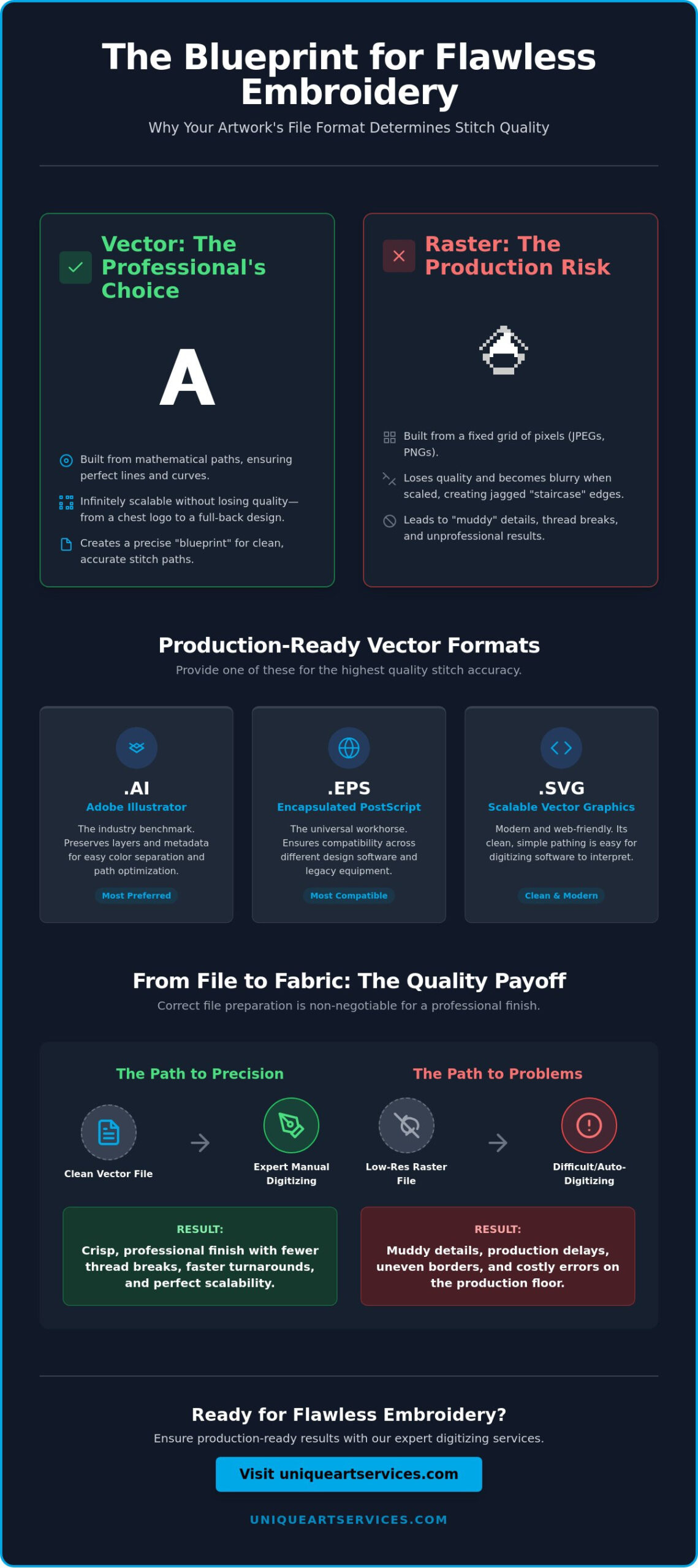
A digital image is not a set of instructions for an embroidery needle. To create a high-quality embroidered logo, a digitizer must translate visual art into a specific path for thread to follow. This is why the source artwork acts as an architectural blueprint. If the blueprint is blurry or imprecise, the final structure will fail. Identifying the best file format for embroidery digitizing starts with choosing vector graphics over raster images.
Vector graphics are built from mathematical paths defined by points, lines, and curves. Unlike raster images, which rely on a fixed grid of colored pixels, vectors remain crisp at any resolution. When a digitizer receives a vector file, they see clean geometric data. This allows them to map out exactly where a satin stitch begins and where a fill stitch ends without guessing around pixelated edges.
Non-vector inputs like JPEGs or PNGs create significant production friction. As these images are enlarged, the pixels stretch, creating jagged “staircase” edges. A digitizing tool or a manual artist struggling with a low-resolution raster file will often produce “muddy” thread transitions. These errors lead to thread breaks, uneven borders, and a finished product that looks unprofessional. Using the best file format for embroidery digitizing ensures that every curve is mathematically perfect before the first stitch is even programmed.
Vector vs. Raster: The Production Impact
Raster pixels often confuse automated digitizing tools. These programs try to assign stitches to every individual pixel variation, resulting in excessive stitch counts and bird-nesting on the back of the garment. Clean vector paths provide a clear map for manual pathing, which is essential for complex logos and small, legible text. For a deeper look at how these file types influence your overall brand presentation, read our guide on Vector vs Raster for Logos: The 2026 Guide to Production-Ready Branding.
The Scalability Factor
One of the greatest advantages of vector art is its versatility across different applications. A single vector file can serve as the source for a 3-inch left-chest logo and a 12-inch full-back jacket design. Because the artwork relies on mathematical proportions rather than a fixed pixel count, the digitizer can scale the design while maintaining perfect geometric integrity. Vector files maintain a perfect ratio of coordinates, allowing digitizers to recalculate stitch density for any size without distorting the design’s original intent.
Essential Vector Graphics File Types for Digitizing
While various file extensions exist, only a select few provide the structural integrity required for high-end production. Choosing the best file format for embroidery digitizing often depends on the complexity of your logo and the software your digitizer utilizes. Providing a true vector file rather than a “wrapped” raster image prevents technical delays and ensures the final stitch count remains efficient.
Professional digitizers typically work with four primary vector formats. Each offers distinct advantages for specific workflows, but they all share the common goal of providing clean, mathematical paths. Understanding these differences allows you to provide the right assets for your best file format for embroidery digitizing needs, leading to faster turnaround times and higher precision.
Adobe Illustrator (.AI) and Professional Digitizing
Adobe Illustrator is the industry benchmark. Most professional digitizers prefer .AI files because they preserve the most metadata and layering information. When you submit an .AI file for a custom embroidery digitizing project, you allow the artist to access original layers. This makes color separation and path optimization significantly easier. To ensure seamless compatibility, it’s often helpful to save your files in a slightly older version, such as Illustrator CC or CS6, to avoid proprietary software conflicts.
The Versatility of .EPS and .SVG
The .EPS (Encapsulated PostScript) format is the universal workhorse of the design world. It functions across various platforms, including CorelDRAW and legacy manufacturing equipment. If you’re working with a diverse team using different design suites, .EPS is often the safest choice for maintaining data integrity. Meanwhile, .SVG (Scalable Vector Graphics) has become a favorite for modern branding. Because .SVG files are built for the web, they focus on simplified, clean pathing. This makes them exceptionally easy for digitizing software to interpret, especially for minimalist logos with clear boundaries.
The Truth About PDF Vectors
A common misconception is that every PDF is a vector file. In reality, a PDF is simply a container. It can hold a high-quality vector or a low-resolution JPEG. For a PDF to be useful in digitizing, it must be exported from vector software with the “Preserve Illustrator Editing Capabilities” option selected. If the source file was a raster image, saving it as a PDF does not magically transform it into a vector. If you’re unsure if your current assets are production-ready, our team provides professional vector art services to clean up your files before the digitizing process begins.
Preparing Vector Files for Machine Compatibility
Selecting the best file format for embroidery digitizing is only the first step in a professional workflow. Even a perfect .AI or .EPS file requires a “pre-flight” check to ensure the artwork is production-ready. Digitizing software interprets vector paths as physical instructions for a needle. If those paths are messy or contain “live” elements, the final embroidery will suffer from registration errors or excessive bulk. Proper preparation eliminates 90% of common production hurdles before they reach the embroidery machine.
Professional preparation involves more than just saving a file. It requires a fundamental understanding of how thread behaves differently than ink or pixels. While a graphic designer might focus on visual aesthetics, a digitizer focuses on path logic. Simplifying your vector assets ensures that the transition from a digital screen to a physical garment is seamless and efficient.
Outlining Fonts and Text
Live text is one of the most common causes of file rejection. Digitizing software cannot read a font file directly. If your digitizer doesn’t have your specific brand typeface installed, their system will substitute it with a generic font, instantly compromising your brand integrity. Converting all text to “outlines” or “curves” is mandatory. This process transforms letters into fixed geometric shapes that cannot be altered. For small-scale text, we recommend keeping letter heights above 5mm. Anything smaller often causes the needle to strike too closely, leading to thread breaks or “bird-nesting” on the underside of the fabric.
Managing Path Complexity
Clean vector paths are the secret to smooth needle movement. Every anchor point in your file represents a potential change in direction for the embroidery machine. Excessive or “stray” anchor points result in jagged edges and increased production time. You must also manage overlapping paths carefully. In digital design, it’s common to stack layers of color. However, an embroidery machine will try to sew every layer it sees. This creates a thick, rigid patch of thread that is uncomfortable and prone to needle breakage. We recommend using the “pathfinder” or “trim” tools to ensure that only one layer of color exists in any given area. This step is essential for creating a clean technical breakdown: the DST embroidery file that runs efficiently on high-speed industrial machines.
Strokes, Fills, and Gradients
Digitizers interpret strokes and fills as different stitch types. A thin stroke in a vector file might be too narrow to support a stable satin stitch. It’s often better to convert strokes into filled shapes to provide clear boundaries for the thread. Additionally, simplify your gradients. While advanced digitizing can achieve color blending, solid color blocks translate much more predictably to thread. Using the best file format for embroidery digitizing allows you to define these color boundaries with mathematical precision, ensuring the finished product matches your original vision.
Beyond the File: Why Manual Conversion is Non-Negotiable
Even if you provide the best file format for embroidery digitizing, software alone cannot produce a professional result. Automated “image-to-stitch” tools often fail because they treat fabric like a static computer screen. In reality, fabric is a flexible material that shifts, stretches, and compresses under the pressure of thousands of needle penetrations. A professional digitizer understands these physics, whereas software simply follows a grid.
Manual conversion is essential because a technician must account for “push and pull” factors. As the needle applies thread, the fabric naturally pulls together in the direction of the stitches and pushes out at the ends. If your digitizer doesn’t manually adjust the vector paths to compensate for this movement, your design will lose its shape. Circles will become ovals; borders will fail to align with the fills they are meant to enclose. Manual pathing ensures that every element lands exactly where it should, regardless of the garment’s weave.
The Human Element in Digitizing
Software lacks the ability to interpret artistic intent or texture. A human digitizer strategically chooses stitch angles to optimize light reflection, making a logo look vibrant rather than flat. This expertise is vital for advanced techniques like 3D puff. This style requires specific pathing to cap off ends and trap foam effectively without it peeking through the thread. You can explore these technical requirements further in our guide on Mastering Digitizing for 3D Puff Embroidery.
Ensuring First-Time-Right Production
The primary goal of manual digitizing is a 99% success rate on the first production run. While auto-digitizing software might seem faster, it often leads to frequent thread breaks and bird-nesting. Manual review acts as a final quality gate, ensuring that vector precision translates into a flawless physical product. Investing in professional manual digitizing provides a much higher ROI than automated tools by eliminating the costs of ruined inventory and wasted machine time. To ensure your assets are handled with this level of technical care, order professional embroidery digitizing services from our seasoned team of experts.
Sharp corners and fine details also require manual intervention. Auto-tools tend to round off sharp points to simplify the stitch path, which ruins the look of professional typography. A manual artist programs the machine to slow down or change density at critical points, preserving the integrity of the original vector artwork. This level of detail is what separates a standard logo from a premium, retail-ready embroidery piece.
Unique Art Services: Global Experts in Vector and Stitch
Identifying the best file format for embroidery digitizing is the necessary starting point, but the final quality of your garment depends on the expertise of the artist handling the conversion. Unique Art Services LLP brings over 15 years of specialized experience in manual vector art and digitizing to every project. We’ve built our reputation as a stable, trustworthy backbone for creative agencies and apparel manufacturers who cannot afford production errors. Our team doesn’t just convert files; we engineer them for high-speed industrial performance.
We don’t use automated tracing or “auto-digitizing” software. While these tools are common in low-cost services, they lack the logic required to handle the physical realities of thread on fabric. Every design submitted to us undergoes a rigorous manual redrawing process. This ensures that every vector path is clean, every anchor point is essential, and every stitch angle is optimized for the best possible light reflection and texture. This meticulous approach is why our clients see a significant reduction in machine downtime and thread breaks.
Rapid Fulfillment for Global Brands
The fast-paced nature of the apparel industry requires a partner who can keep up with tight deadlines. We’ve established global service hubs to ensure round-the-clock production support for our clients. Whether you’re in New York or London, our team is working on your assets while you sleep. Our standard turnaround is a brisk 12 hours, but we also offer 4-hour rush order capabilities for those critical, last-minute projects. Every file passes through a multi-stage quality check to ensure technical accuracy before delivery.
Get your production-ready files in as little as 4 hours.
Comprehensive Design Solutions
Our capabilities cover the entire creative workflow. We offer everything from initial logo design to the creation of production-ready embroidery file types tailored to your specific machinery. Unique Art Services LLP provides the best file format for embroidery digitizing along with the manual expertise needed to make those files run perfectly on the first try. Top apparel manufacturers trust our technical specifications because we understand the nuances of different fabric weights.
Don’t settle for “good enough” when it’s your brand’s physical representation on the line. Our flat-rate pricing and commitment to manual precision ensure you receive the highest ROI on every design. Reach out to our team today to secure a quote and see how our 15 years of craftsmanship can streamline your embroidery production.
Achieve Production Excellence with Precision Vector Assets
Success in commercial embroidery starts with the mathematical precision of vector paths. By selecting the best file format for embroidery digitizing and implementing the preparation techniques discussed, you remove the guesswork from your production workflow. High-quality inputs like .AI or .EPS files aren’t just suggestions; they are the baseline for achieving crisp edges and durable, high-density fills that survive the life of the garment.
Unique Art Services LLP bridges the gap between digital design and physical craftsmanship with a 99% first-time-right rate. With over 15 years of experience and 4-hour rush processing available, we ensure your technical requirements are met with speed and authority. Upload your artwork for 12-hour professional digitizing today to secure production-ready files that run smoothly on any machine. We’re ready to help you transform your creative vision into a tangible, professional reality.
Frequently Asked Questions
What is the absolute best vector graphics file type for embroidery?
Adobe Illustrator (.AI) is widely considered the best file format for embroidery digitizing. It provides the most comprehensive data for layers and pathing, which allows the digitizer to manipulate individual elements without any loss in resolution. This format ensures that every curve and line is mathematically perfect before the digitizing process begins.
Can I use a PNG file if it has a transparent background?
A PNG is a raster file, regardless of its transparency. While a transparent background is helpful for visual reference, the image is still composed of pixels that lack the mathematical coordinates required for precise stitch mapping. To achieve professional results, a PNG must be manually redrawn as a vector file before it can be digitized.
Why do digitizers ask for fonts to be converted to curves or outlines?
Digitizers require outlines to ensure your branding remains consistent across different systems. If a font isn’t converted to curves, the digitizing software may substitute it with a default typeface if the specific font isn’t installed. Outlining turns the text into permanent geometric shapes that preserve your brand’s unique typography.
Is a PDF always a vector file?
A PDF is only a vector file if it was originally created in vector software and saved with editing capabilities preserved. If a raster image is simply “saved as” a PDF, it remains a pixel-based file and isn’t the best file format for embroidery digitizing. You can check this by zooming in; if the edges become blurry, it’s a raster file.
What happens if I only have a low-resolution JPEG of my logo?
A low-resolution JPEG requires a manual redraw into vector art before digitizing can start. Attempting to digitize directly from a blurry image leads to jagged borders and inefficient stitch paths that can cause thread breaks. Our team specializes in redrawing these files to ensure they are production-ready.
How does vector file quality affect the cost of digitizing?
Clean vector files streamline the production workflow and reduce the labor required for manual pathing. Providing a high-quality source file ensures a faster turnaround and minimizes the need for multiple sample runs. While complexity influences the stitch count, starting with a perfect vector file is the most efficient way to manage production costs.
Can vector graphics be used for 3D puff embroidery digitizing?
Vector graphics are the mandatory starting point for 3D puff designs. The clean, sharp lines of a vector allow the digitizer to program the specific “stop and start” points necessary to trap foam and create a raised effect. Without the precision of a vector, the foam can peek through the stitches, ruining the 3D look.
Do I need different vector files for different embroidery machines?
You only need one high-quality vector source file. A professional digitizer uses that single vector to create various machine-specific files, such as .DST for industrial equipment or .PES for home machines. The vector art serves as the universal blueprint that can be translated into any machine language.